WordPress Form Builder — Without the Plugin
FormNX is a WordPress form builder you use without installing a plugin. Build your form in FormNX, then embed it on any WordPress page - Gutenberg or Classic editor - with one snippet. Nothing to install, update, or maintain, and submissions are stored safely in FormNX.















































The no-plugin way
How to Build a WordPress Form Without a Plugin
Most WordPress form builders are plugins - you install them into wp-admin, they load their own code on your site, store submissions in your WordPress database, and you keep them (and their add-ons) updated forever. FormNX takes a different path: it is a hosted WordPress form builder. You build the form once in FormNX, then drop a single embed snippet onto a WordPress page.
That means no plugin to install, no plugin to update on every WordPress release, no add-on conflicts, and no extra plugin code weighing down your site. The form works the same on a self-hosted WordPress site, a WordPress.com site that does not allow plugins, or a page builder like Elementor or Divi - anywhere you can paste an embed. And because the form lives in FormNX, the same account powers forms across every WordPress site you run.
"I really appreciate FormNX for its simplicity and intuitiveness. It's easy to use and just works perfectly for my needs. The form builder is especially straightforward, and I've found the OTP function to be a great feature. Setting it up was extremely easy, and I was able to have a form ready within an hour."

The case for FormNX
Why Build WordPress Forms With FormNX
No plugin to install, update, or maintain
A native form plugin is one more thing to keep current - new versions, security patches, add-on compatibility on every WordPress release. FormNX is hosted and embedded, so there is nothing in your WordPress install to update or break. You build the form; we maintain the software and infrastructure.
Keeps your WordPress site fast & dependency-free
Every plugin you add loads more code and adds another dependency that can affect speed and security. Because the form is hosted by FormNX and simply embedded, it does not pile plugin code onto your site or run submission queries against your WordPress database - one fewer dependency, a lighter, faster site.
Submissions stored safely in FormNX
Form data is saved in the FormNX database, not tangled into your WordPress install. Change your theme, migrate hosts, switch your database, or move off WordPress entirely - your submission history stays intact in your FormNX dashboard, with search, export, and response charts.
One subscription, unlimited WordPress sites
You are not buying a per-site plugin license. One FormNX account builds and powers forms across as many WordPress websites as you run - ideal for agencies and anyone managing multiple sites. Build once, embed everywhere.
Advanced features built in — not add-ons
Conditional logic, multi-step forms, payments, e-signatures, spam protection, and PDF generation are all included - no separate plugin or paid add-on per feature, and no add-on stack to reconcile on each update.
Works in Gutenberg, Classic editor & page builders
Paste the embed into a Gutenberg Custom HTML block, the Classic Editor Text tab, or an Elementor / Divi HTML widget. The same form works the same way everywhere - and outside WordPress too, on a shared link, popup, or any other site.
What is included
Everything Your WordPress Forms Need, Built In
"Has everything I need to build forms for my client websites. I love the fact that I can create a google sheet per client and all the data can be seen on the google sheet. The developers reply back always and have even implemented a few requests FAST to make the form set up even better. I Highly recommend. Also, hoping..."

Two editors, one snippet
How to Embed a FormNX Form in WordPress
Build your form in FormNX, copy the embed snippet, and add it to your page. It works in both WordPress editors.
In the Gutenberg block editor
Edit your page, add a Custom HTML block (or the Embed block), paste the FormNX snippet, and click Update. The form renders inside your page layout - no plugin block to install.
In the Classic Editor
Open your page, switch to the Text (HTML) tab, paste the FormNX snippet where you want the form, and update. Works the same in Elementor or Divi via their HTML/embed widget.
Just need a website contact form? See the no-code contact form guide. Switching from a contact form plugin? See the Contact Form 7 alternative comparison.
Hosted vs plugin
FormNX vs Traditional WordPress Form Plugins
An honest comparison of the embedded, hosted approach against installing a native WordPress form plugin.
| Dimension | FormNX (Hosted & Embedded) Recommended | Native WordPress Form Plugin |
|---|---|---|
| Installation | Paste an embed snippet. Nothing installed in wp-admin. | Install + activate a plugin (and often several add-ons). |
| Updates & maintenance | Nothing to update - FormNX maintains the software for you. | Update the plugin + add-ons on every release; updates can break forms. |
| Site performance | No plugin code or DB queries added to your site - lighter, fewer dependencies. | Loads plugin assets and runs DB queries on your WordPress install. |
| Where submissions live | In FormNX - survives theme, host, and database changes. | In your WordPress database (or emailed only, for some plugins). |
| Use across multiple sites | One account powers forms on unlimited WordPress sites. | Often a per-site license for the pro plugin + add-ons. |
| Advanced features | Logic, payments, e-sign, PDFs, spam protection all built in. | Many features are separate add-ons, often on higher tiers. |
| Works beyond WordPress | Same form embeds anywhere, plus shared link & popup. | Tied to WordPress only. |
| Data stays self-hosted | Form data is hosted by FormNX, not on your own server. | Data lives on your own WordPress server - the one clear plugin advantage. |
Bottom line: a native plugin wins only if keeping form data 100% self-hosted on your own server is a hard requirement. For everyone else, the hosted, no-plugin approach is faster to ship, lighter on your site, and nothing to maintain.
"I have been using formnx for the past 2 weeks and have found it easy to build forms quickly and have been able to make modifications efficiently. A real asset in using this app is the quick response time by the vendor, quite often. within 10 minutes. The vendor has also made changes, within days, to the builder as per..."

Skip the blank canvas
Form Templates to Start From
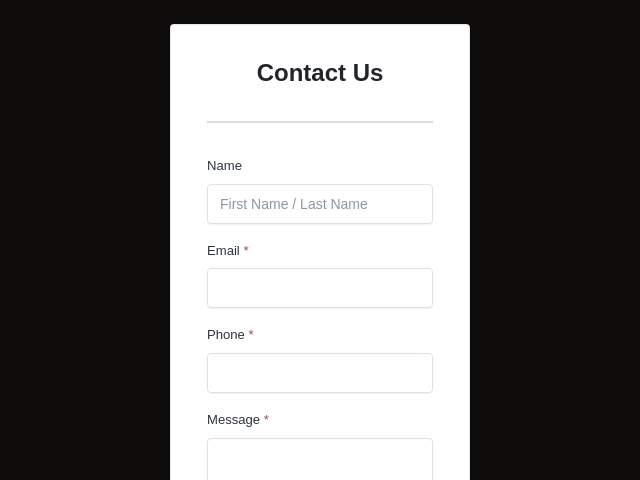
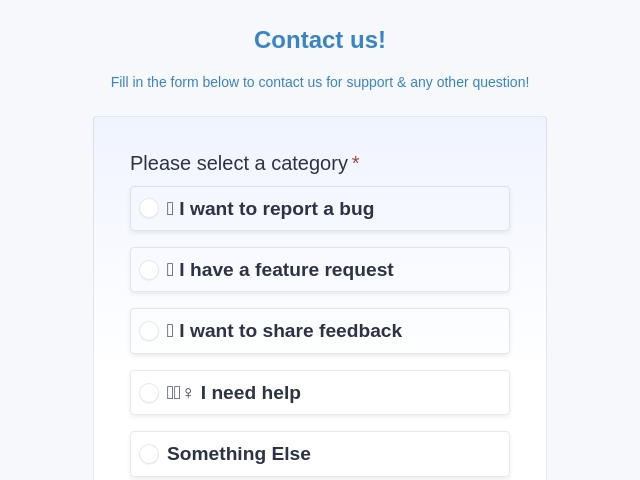
Start from a ready-made template, then embed it on your WordPress site with one snippet. Pick a design, change the fields and branding, and publish - no plugin to install or maintain.



FormNX vs WordPress Form Plugins: FAQs
-
Can I build WordPress forms without a plugin?
Yes. FormNX is a hosted form builder - you build the form in FormNX, then embed it on any WordPress page with a single snippet. There is no plugin to install, so there is no plugin to update, no plugin to break on a WordPress core release, and no extra code loading on your site beyond the embed. It works on any WordPress install, including WordPress.com plans that do not allow custom plugins.
-
How do I add a form to WordPress with FormNX?
Build your form in the FormNX drag-and-drop builder, click Embed, and copy the snippet. In the WordPress block (Gutenberg) editor, drop a Custom HTML block (or the Embed block) onto your page and paste it. In the Classic Editor, switch to the Text/HTML tab and paste it there. Publish the page and the form is live - no plugin, no shortcode plugin, no FTP.
-
Does FormNX work with both the Gutenberg block editor and the Classic Editor?
Yes. The FormNX embed works in the Gutenberg block editor (via a Custom HTML or Embed block), the Classic Editor (via the Text/HTML tab), and popular page builders like Elementor and Divi (via their HTML/embed widget). Wherever you can paste an embed snippet, the form renders.
-
Will FormNX slow down my WordPress site?
A hosted, embedded form adds far less weight than a form plugin. A native form plugin loads its PHP, CSS, and JavaScript on your site and runs queries against your WordPress database on every submission. With FormNX the form is hosted externally and embedded, so it does not add plugin code to your WordPress install or run submission queries against your database - which keeps your site lighter and removes one more plugin from the dependency chain that can affect performance and security.
-
Where are my form submissions stored?
Submissions are stored in the FormNX database, not your WordPress database, and are available in your FormNX dashboard with search, filtering, export, and visual response reports. Because the data lives in FormNX, it is unaffected if you change WordPress themes, migrate hosts, switch databases, or even move off WordPress entirely - your submission history travels with your FormNX account, not with a particular WordPress install.
-
Can I use one FormNX subscription on multiple WordPress websites?
Yes. One FormNX subscription works across as many WordPress sites as you like - build the forms in your FormNX account and embed them on any number of WordPress sites. You are not buying a per-site plugin license; the same account powers forms on every site you run, which is especially useful for agencies and anyone managing multiple WordPress websites.
-
Is FormNX a free WordPress form builder?
FormNX has a free plan with unlimited forms and unlimited submissions, including the drag-and-drop builder, conditional logic, and multi-step forms - all embeddable on WordPress at no cost. Advanced features like payments, e-signatures, PDF generation, and white labeling are on the paid tiers. You can build and embed a fully working WordPress form on the free plan.
-
Do I need to update or maintain anything?
No. Because FormNX is hosted, there is nothing in your WordPress install to update - no plugin version to keep current, no add-on compatibility to check against each WordPress release, and no security patches to chase. FormNX maintains the form software, spam protection, and infrastructure for you. The embed snippet on your page keeps working without intervention.
-
How does FormNX compare to WPForms, Gravity Forms, or Contact Form 7?
WPForms, Gravity Forms, Fluent Forms, and Contact Form 7 are native WordPress plugins - they live in your wp-admin and store data in your WordPress database, which some teams specifically want, but you also maintain them and their add-ons. FormNX is a hosted builder you embed: nothing to install or maintain, submissions stored in FormNX (portable across hosts and CMSs), one account across unlimited sites, and conditional logic, payments, e-signatures, and PDF generation built in rather than split across add-ons. If you are moving off Contact Form 7 specifically, see the Contact Form 7 alternative comparison.
-
Can I collect payments on a WordPress form with FormNX?
Yes. FormNX includes native Stripe and PayPal on the same form, so a WordPress form can take payments, donations, or paid bookings without a separate payment plugin. Combine it with calculation fields for dynamic totals. See the payment forms feature for details.
-
Can I embed a Google Form in WordPress instead?
Yes - if you specifically want to embed an existing Google Form, you can paste its iframe into a Custom HTML block in WordPress, and our Google Form embed tool generates a clean, responsive version. The catch is that an embedded Google Form keeps the "Powered by Google" footer, cannot auto-resize, and is sandboxed from your page styling. If you want a form that matches your WordPress theme, takes payments, and has no third-party branding, build it in FormNX and embed that instead - the same one-snippet process, and no plugin either way.
-
What is the best form builder for WordPress?
It depends on whether you want a plugin. The most popular WordPress form plugins are WPForms, Gravity Forms, Fluent Forms, and Ninja Forms - they live inside wp-admin and store data in your WordPress database, which suits teams that want everything self-hosted and are happy to install, update, and maintain a plugin plus its add-ons. If you would rather not add another plugin, FormNX is the hosted alternative: build the form once and embed it on any WordPress site with one snippet - nothing to install or update, submissions stored in FormNX, and conditional logic, payments, e-signatures, and PDFs built in.
Still comparing?
Ask your favorite AI how FormNX stacks up against WordPress Form Plugins.
Build Your First WordPress Form Without a Plugin
Free to start, no credit card. Build in FormNX, embed on your WordPress site in minutes - nothing to install, update, or maintain.
Get Started Free Book a Demo
 Reviews on Trustpilot
- Alternatives
- Jotform Alternative
- Typeform Alternative
- Google Forms Alternative
- SurveyMonkey Alternative
- Contact Form 7 Alternative
- Paperform Alternative
- Microsoft Forms Alternative
- Fillout Alternative
- Tally Forms Alternative
- Gravity Forms Alternative
- Cognito Forms Alternative
- Formstack Alternative
- Wufoo Alternative
- All Alternatives
- Pricing Guides
- Jotform Pricing
- Typeform Pricing
- SurveyMonkey Pricing
- Use Cases
- No-Code Form Builder
- Online Survey Builder
- AI Form Builder
- Online Quiz Maker
- Job Application Form Builder
- Order Form Builder
- Screen Printing Order Form
- Wholesale Order Form
- WordPress Form Builder
- Contact Form
- Nonprofit Form Builder
- Squarespace Form Builder
- Wix Form Builder
- Webflow Form Builder
- Framer Form Builder