Conditional Logic Forms
Build dynamic forms that show, hide, or skip fields based on what each respondent answers. Set up unlimited conditional logic, skip logic, and branching logic rules visually - free on every plan, no code required.
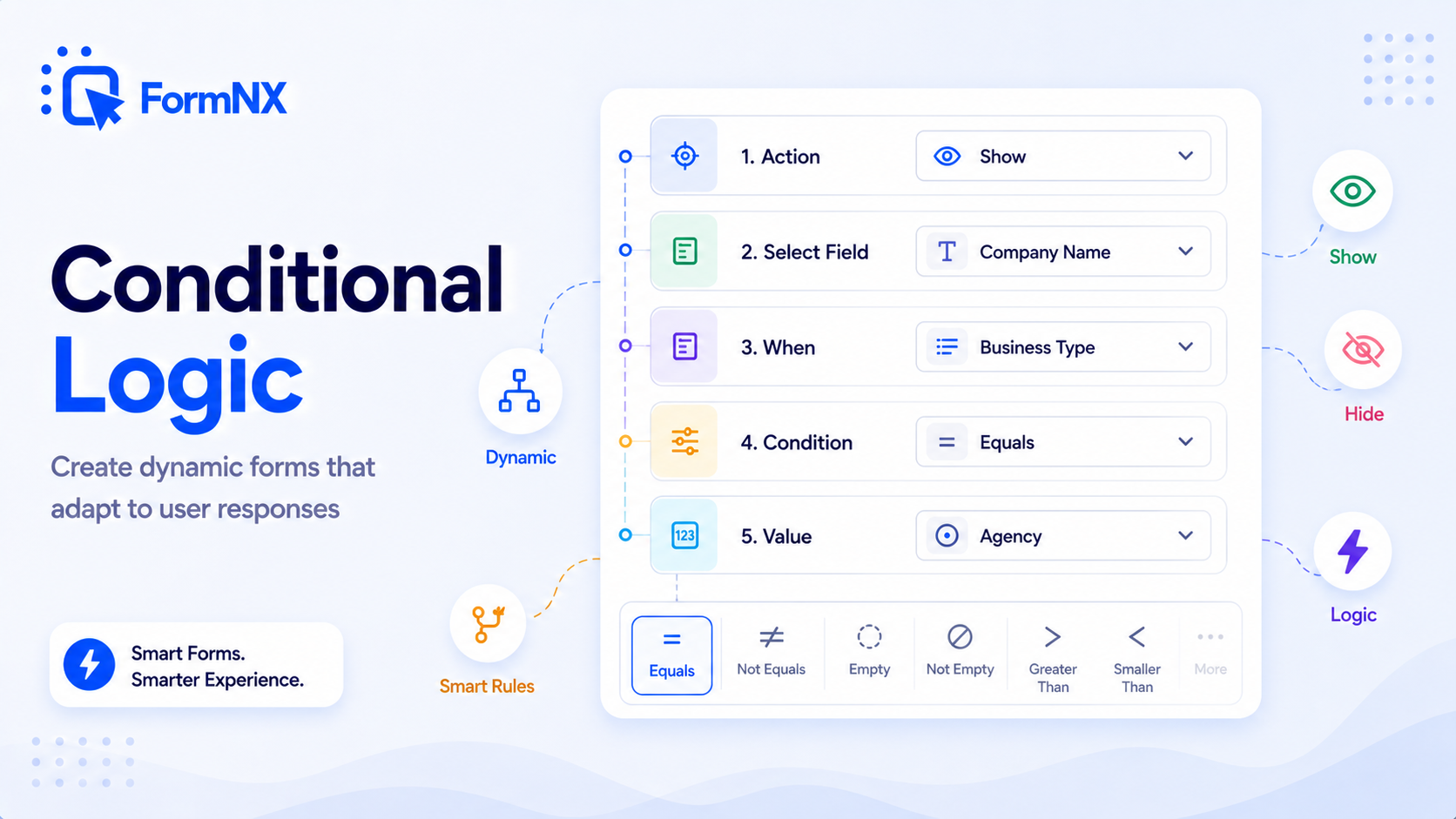








































What makes it essential for your forms
Why Use Conditional Logic Forms?
Show Only Relevant Questions
Dynamically show or hide fields based on previous answers. Respondents see only what applies to them - no irrelevant questions, no wasted time.
Reduce Form Abandonment
Shorter, personalized forms have higher completion rates. Conditional logic removes friction by skipping sections that do not apply to each respondent.
No Coding Required
Set up conditional rules through a visual builder - select a trigger field, pick a condition, and choose what to show or hide. No JavaScript or plugins needed.
Collect Cleaner Data
When respondents skip irrelevant fields, you get fewer blank entries and more accurate responses. Validation is automatically enforced only on visible fields.
Multiple Conditions Per Field
Apply multiple rules to a single field using AND/OR logic. Create complex branching flows - like showing a section only when two separate conditions are both met.
Works on Every Device
Conditional logic runs seamlessly on desktop, tablet, and mobile. Fields show and hide instantly with no page reload - the same smooth experience everywhere.
Get up and running in minutes
How to Use Conditional Logic Forms
Add Your Form Fields
Open the Conditions Panel
Pick a Trigger Field & Rule
Publish Your Dynamic Form
Step-by-step tutorial
Watch Conditional Logic Forms in action
What Is Conditional Logic in Forms?
Conditional logic - also called skip logic or branching logic - is a form-builder feature that controls which fields a respondent sees based on their previous answers. Instead of showing every field to every person, conditional logic adapts the form in real time: if someone selects "Yes" to a question, related follow-up fields appear; if they select "No," those fields stay hidden and the form moves on.
The result is a shorter, more relevant form. Respondents only answer questions that apply to them, which reduces drop-off and improves the quality of data you collect. FormNX is a free conditional logic form builder that lets you set every rule visually - no JavaScript, no WordPress plugin, no developer involvement.
How Conditional Logic Works in FormNX
FormNX provides a visual, no-code condition builder that lives directly inside the form builder. There are two ways to set up conditional logic:
- From the Settings tab - open the Conditions section under Settings, add a rule, choose a trigger field, set the condition (Equals, Not Equals, Empty, or Not Empty), and define which field to show or hide.
- From the field itself - click any field, open its Condition tab on the right panel, and add conditions right there. This is the fastest way to add logic to individual fields.
You can apply multiple conditions to a single field, and FormNX handles validation automatically - required fields are only enforced when the field is actually visible to the respondent. No extra configuration needed.
Why Use a Form Builder with Conditional Logic?
Forms without conditional logic force every respondent through the same set of questions. This creates unnecessary friction: a 20-field form where only 8 fields are relevant feels like a chore. Conditional logic forms solve this by showing only what matters:
- Lower form abandonment - shorter, relevant forms have higher completion rates. Respondents are less likely to quit a form that feels personalized to them.
- Cleaner data - when people only answer relevant questions, you collect fewer blank fields, fewer "N/A" responses, and more accurate information.
- Better user experience - dynamic forms that adapt to answers feel modern and professional. They show respondents you respect their time.
- No developer needed - with FormNX, you set up rules visually. No JavaScript, no custom code, no plugins to install.
- Works with multi-step forms - combine conditional logic with page breaks to skip entire pages for respondents who do not need them.
Skip Logic vs Branching Logic vs Conditional Logic
These three terms describe variations of the same idea - controlling form flow based on respondent answers - and FormNX handles all of them through one visual rule builder:
- Conditional logic - the broadest term. Any rule that shows, hides, or requires a field based on a condition. Example: "Show the spouse name field only if marital_status equals married."
- Skip logic - rules that skip fields or whole pages a respondent should not see. Example: "Skip step 3 if the applicant is not employed."
- Branching logic - rules that route respondents down different paths based on their answers. Example: "If product type = Hardware, show the shipping section; if product type = Software, show the license section."
All three are built the same way in FormNX: pick a trigger field, set a condition, and define what to show, hide, or skip. The same rules work on single-page forms, multi-step forms, surveys, quizzes, and lead capture flows.
Conditional Logic Form Examples
Common ways teams use conditional form logic include:
- Survey branching - ask "Do you own a pet?" and only show pet-related questions if the answer is "Yes."
- Lead qualification - route leads down different question paths based on company size, budget, or industry. High-intent leads see contact-info fields earlier in the flow.
- Application screening - show a "Skills Assessment" section only when an applicant selects "Experienced" as their level.
- Order forms - display shipping address fields only when the customer chooses "Delivery" instead of "Pickup."
- Event registration - show dietary restriction fields only when an attendee selects "Yes" for the meal option.
- Product recommendation quizzes - branch users to different result pages based on their preferences and constraints.
- Insurance and loan applications - skip irrelevant sections based on policy type, applicant status, or coverage selection.
- Support request forms - route the request to the right team by showing follow-up fields based on category.
Conditional Logic on Multi-Step Forms
Conditional logic gets even more powerful on multi-step forms. Instead of just showing or hiding individual fields, you can skip entire pages that do not apply to a respondent. For example, an onboarding form might skip page 3 (team setup) for solo users who selected "Just me" on page 1. The same FormNX condition rules apply to both single-page and multi-step forms - one builder, one rule format, no extra setup.
Embed Your Conditional Logic Form Anywhere
Every form you build with FormNX works on any site. Embed it on WordPress (Gutenberg block, shortcode, or Elementor widget), Webflow, Shopify, Wix, Squarespace, or paste the embed code into a custom HTML site. You can also share the direct form link or trigger the form as a popup overlay. Conditional logic runs in the browser and behaves identically wherever the form lives - no separate WordPress conditional logic plugin to install, no Webflow custom code to write.
FormNX vs Other Conditional Logic Form Builders
Most popular form builders gate conditional logic behind paid plans (Jotform, Cognito Forms, Formstack) or sell it as a paid add-on (Ninja Forms, Gravity Forms charge $29-49 for their conditional logic extension). FormNX includes conditional logic on every plan - including the forever-free plan - with no limit on the number of rules or fields.
You also get features competitors charge extra for: conditional page skipping on multi-step forms, Stripe and PayPal payments triggered by conditions, conditional confirmation messages, and conditional email notifications - all configured through the same visual rule builder. Unlike Google Forms, which only supports basic section branching, FormNX gives you field-level Show/Hide rules, AND/OR conditions, and the same conditional logic across single-page and multi-page forms.
Common use cases where Conditional Logic Forms excels
What You Can Build with Conditional Logic Forms
Don't just take our word for it
Hear from our customers
"I've been looking for an alternative to Jotform - one that would accept payments directly from the form. The learning curve is short, supported by great customer service which never let me down."


"There are super features in this form creator. They REALLY took a lot of time to create a fantastic program. I was using another form creator but switching a lot of my forms to this application. The tech support is amazing."

"Easy to build forms from scratch with a long list of fields. Don't want to start from scratch? No problem — many templates available. Every integration I can think of is available. Customer support is quick and very helpful."


Conditional Logic Forms: Frequently Asked Questions
-
What is conditional logic in forms?
Conditional logic in forms - also called skip logic or branching logic - lets you show or hide form fields based on how a respondent answers previous questions. For example, if someone selects "Yes" to a question, you can reveal follow-up fields related to that answer. If they select "No," those fields stay hidden. This makes forms shorter, more relevant, and easier to complete.
-
What is the difference between conditional logic, skip logic, and branching logic?
All three terms describe rules that change form flow based on respondent answers. Conditional logic is the broadest - any rule that shows, hides, or requires a field based on a condition. Skip logic specifically refers to skipping fields or pages a respondent should not see. Branching logic routes respondents down different paths based on their answers. FormNX handles all three through one visual rule builder.
-
Is FormNX a free form builder with conditional logic?
Yes. FormNX includes conditional logic on every plan, including the forever-free plan. There are no limits on the number of conditions you can create, and you get unlimited forms and unlimited responses. Most other form builders gate conditional logic behind paid plans or charge $29-49 for a conditional logic add-on - FormNX includes it free with no credit card required.
-
How do I add conditional logic to a form in FormNX?
There are two ways: you can open the Settings tab in the form builder and use the Conditions section to create rules, or you can click any individual field, go to its Condition tab, and add rules directly. Both methods use a visual, no-code interface - just select a trigger field, pick a condition (Equals, Not Equals, Empty, or Not Empty), and define what to show or hide.
-
Can I set multiple conditions on a single form field?
Yes. You can apply multiple conditions to any field with AND/OR logic. This allows you to build complex rules - for example, show a field only when a respondent selects a specific option AND another field is not empty. FormNX handles validation automatically, only enforcing required rules on fields that are currently visible.
-
What condition types does FormNX support?
FormNX supports four condition types: Equals, Not Equals, Empty, and Not Empty. These cover the most common conditional logic scenarios - from simple yes/no branching to checking whether a field has been filled in. You can combine multiple conditions on a single field with AND/OR logic for more advanced rules.
-
Does conditional logic work with multi-step forms?
Yes. Conditional logic works across both single-page and multi-step forms in FormNX. You can show or hide fields within a step, or use conditions to skip entire pages a respondent does not need - creating a branching, personalized form flow that feels custom-built for each user.
-
Can you do conditional logic in Google Forms? How is FormNX different?
Google Forms only supports basic section branching - you can route respondents to different sections based on multiple-choice answers, but you cannot show or hide individual fields. FormNX gives you field-level Show/Hide rules, AND/OR conditions, Equals/Not Equals/Empty/Not Empty checks, and the same logic across single-page and multi-page forms - all free.
-
Does conditional logic work on mobile devices?
Yes. All conditional logic runs in the browser and works identically on desktop, tablet, and mobile. Fields show and hide instantly with no page reload, so the experience is smooth and consistent on every device.
-
Can I add conditional logic to WordPress forms?
Yes. Forms built with FormNX can be embedded on any WordPress site via Gutenberg block, Classic Editor shortcode, or Elementor widget - no separate WordPress conditional logic plugin needed. All Show/Hide rules, skip logic, and branching logic work exactly the same whether the form is embedded on WordPress, Webflow, Shopify, or shared via a direct link.
-
Can I trigger payments or notifications conditionally?
Yes. FormNX supports conditional Stripe and PayPal payments (charge different amounts based on a respondent's selections), conditional email notifications (route submissions to different team members based on the answer), and conditional confirmation messages. All three are configured through the same visual rule builder as field-level conditional logic.
-
What is the best form builder with conditional logic?
The best form builder with conditional logic is one that includes it free, applies it at the field level (not just whole sections), and does not cap the number of rules. Most options gate it: WPForms, Jotform, and Formstack put conditional logic on paid tiers; Ninja Forms and Gravity Forms sell it as a paid add-on; and Google Forms and Microsoft Forms only offer basic section branching. FormNX includes field-level conditional logic - show, hide, skip, and branch with unlimited Equals / Not Equals / Empty / Not Empty rules and AND/OR conditions - on every plan, including the forever-free one.
-
Can Microsoft Forms do conditional logic?
Microsoft Forms supports basic branching - it can jump a respondent to a different section based on a choice answer - but it does not offer field-level show/hide rules, AND/OR conditions, or logic on individual questions. If you need true field-level conditional logic without leaving a familiar no-code editor, FormNX gives you Show/Hide rules, skip logic, and branching on every plan, embeddable on any site.
Ready to Use Conditional Logic Forms?
Start building professional forms with this powerful feature today
Get Started Free NowOther features that work great with Conditional Logic Forms
More Related Features
Ready-Made Templates
Skip the blank page. Pick from 1,000+ templates for surveys, registrations, orders, feedback, and more - then customize...
See How It WorksDrag & Drop Form Builder
Build any web form by dragging fields onto a visual canvas. No HTML, no code - just pick a field, drop it in place, set...
See How It WorksPowerful Form Fields
35+ field types - from text inputs and dropdowns to signature capture, matrix tables, star ratings, and voice recording....
See How It Works
- Alternatives
- Jotform Alternative
- Typeform Alternative
- Google Forms Alternative
- SurveyMonkey Alternative
- Contact Form 7 Alternative
- Paperform Alternative
- Microsoft Forms Alternative
- Fillout Alternative
- Tally Forms Alternative
- Gravity Forms Alternative
- Cognito Forms Alternative
- Formstack Alternative
- All Alternatives
- Pricing Guides
- Jotform Pricing
- Typeform Pricing
- SurveyMonkey Pricing
- Use Cases
- No-Code Form Builder
- Online Survey Builder
- AI Form Builder
- Online Quiz Maker
- Job Application Form Builder
- Order Form Builder
- Screen Printing Order Form
- Wholesale Order Form
- WordPress Form Builder
- Contact Form
- Nonprofit Form Builder
- Squarespace Form Builder
- Wix Form Builder
- Webflow Form Builder
- Framer Form Builder