Multi-Step Form Builder
Split long forms into multiple pages with a free drag-and-drop multi-step form builder. Add page breaks, a progress bar, and per-step validation - boost completion rates without writing a single line of code.
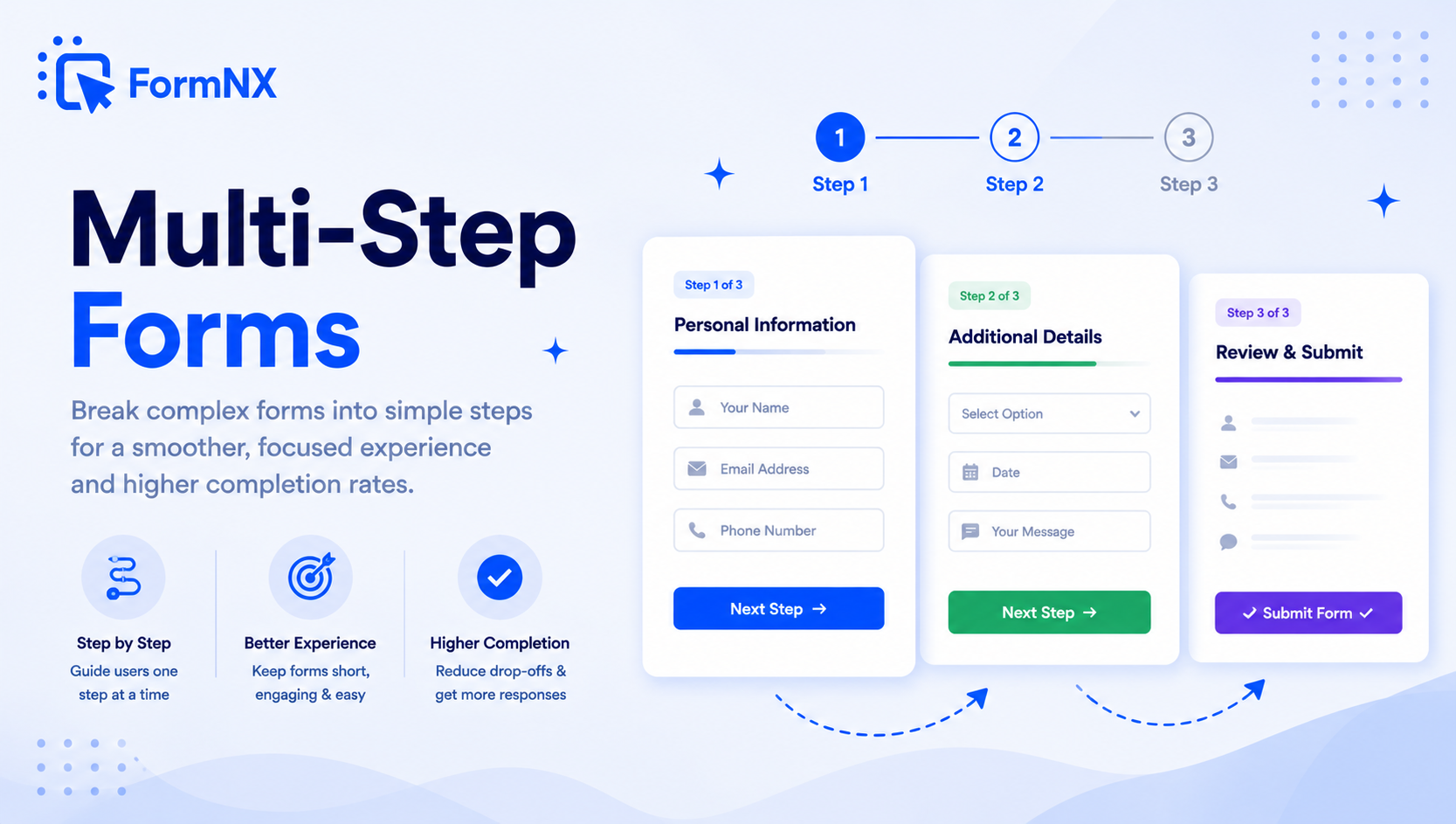








































What makes it essential for your forms
Why Use Multi-Step Form Builder?
Higher Completion Rates
Breaking forms into steps makes each page feel achievable. Respondents who complete the first step are committed and far more likely to finish the entire form.
Built-In Progress Bar
Show respondents exactly how far they have progressed and how many steps remain. The visual progress indicator keeps users motivated to reach the finish.
Per-Step Validation
Field validation runs when the respondent clicks "Next" - errors are caught before they move on. No more submitting a long form only to scroll back hunting for mistakes.
Drag & Drop Page Breaks
No coding, no HTML templates. Just drag a Page Break element onto your form canvas wherever you want a new step to begin. Add as many pages as you need.
Conditional Page Skipping
Combine multi-step forms with conditional logic to skip entire pages that are not relevant. Each respondent sees only the steps that apply to them.
Mobile-Responsive by Default
Every multi-step form adapts to phones, tablets, and desktops automatically. Short, focused pages work especially well on small screens where long scroll is painful.
Get up and running in minutes
How to Use Multi-Step Form Builder
Drag & Drop Your Form Fields
Insert a Page Break to Create a Step
Turn On Progress Bar & Validation
Embed Anywhere or Share the Link
What Is a Multi-Step Form?
A multi-step form - also called a multi-page form or wizard form - splits a long form into smaller sections shown one page at a time. Instead of confronting respondents with 20 fields on a single screen, the form is broken into logical groups: contact info on page one, preferences on page two, payment on page three. Each step is completed before the next one appears.
The result is a form that feels shorter, looks cleaner, and consistently outperforms equivalent single-page forms on completion rate. FormNX gives you a free multi-step form builder that handles every part of this visually - no HTML, JavaScript, WordPress plugin, or Bootstrap template required.
How to Build a Multi-Step Form with FormNX (No Code)
Creating a multi-step form with our drag-and-drop builder takes under a minute:
- Open the FormNX form builder - start a new form or open one you already have.
- Drag a Page Break onto the canvas - find "Page Break" in the left field panel and drop it where you want the first page to end. Everything below the page break becomes the next step.
- Add more page breaks for additional steps - there is no limit on the number of pages. You can also use the "Add Page Break" shortcut button to insert one in a single click.
- Turn on per-step validation - required-field checks run when respondents click "Next," so errors are surfaced before they move on instead of hitting them all at once at the end.
- Enable the progress bar - flip the toggle in form settings and FormNX shows respondents how far through the form they are.
- Publish your multi-page form - embed it on your site, share the direct form link, or trigger it as a popup. The form is responsive on desktop, tablet, and mobile by default.
Why Multi-Step Forms Boost Completion Rates
Long single-page forms intimidate respondents. The moment someone opens a form and sees 30 fields stacked vertically, they reach for the close button. Multi-page forms work because they:
- Reduce visual overload - showing 4-6 fields per step feels achievable. A 30-field page feels like a chore.
- Build commitment momentum - respondents who complete step one are psychologically invested and far more likely to finish the form.
- Group information logically - "personal details," "preferences," "payment" feels organised; one giant scrolling list does not.
- Surface errors per step - validation runs at each transition, so respondents fix one issue at a time instead of facing a wall of errors at submission.
- Pair with conditional logic - skip entire pages that do not apply to a respondent and create a personalized form path that feels custom-built for them.
Multi-Step Form Examples (Use Cases)
A multi-page form is worth using whenever you collect more than 5-7 fields or your form covers different categories of information. Common examples include:
- Job application forms - step 1: contact details, step 2: work experience, step 3: resume upload and cover letter.
- Lead qualification forms - step 1: low-friction questions (company size, industry), step 2: budget and timeline, step 3: contact details. Start easy to build commitment, then ask the harder questions.
- Event registration forms - step 1: attendee info, step 2: session selections, step 3: dietary needs and payment.
- Patient intake forms - step 1: demographics, step 2: medical history, step 3: insurance, step 4: consent and e-signature.
- Real estate lead capture forms - step 1: property preferences, step 2: budget and timeline, step 3: contact info. Multi-step lead forms regularly capture 2x more leads than single-page versions.
- Quote and booking forms - step 1: service or product selection, step 2: customisation options, step 3: shipping and payment. For a real product range with images, variants and a cart, use the Products field.
- Customer onboarding forms - step 1: account setup, step 2: preferences, step 3: team invitations.
- Multi-step surveys - long surveys grouped into topical sections that respondents are far more likely to finish.
- Insurance and loan application forms - high-friction forms where breaking the journey into stages keeps applicants moving forward.
Free Multi-Step Form Templates
FormNX includes ready-made multi-step form templates so you do not have to start from a blank canvas. Pick a template for job applications, event registration, lead qualification, patient intake, quote requests, or order forms, then customise the fields, branding, and confirmation messages. Every template is free and unlocks the same multi-step features - page breaks, progress bar, per-step validation, and conditional logic.
Multi-Step vs Single-Page Forms: Which Should You Use?
Single-page forms are best for short forms with 2-6 fields where multi-page navigation would add unnecessary friction - contact forms, newsletter signups, quick feedback. Beyond that, multi-step forms win:
- Completion rate - multi-step forms consistently outperform single-page forms once you cross 7+ fields, because each step feels achievable.
- Perceived length - showing 4 fields at a time makes a 20-field form feel like a quick interaction.
- Validation experience - per-step validation is friendlier than dumping every error after submit.
- Mobile usability - small screens make long scrolling forms painful; multi-step keeps every screen short and focused.
- Drop-off insight - because submissions happen in stages, you can see exactly which step is causing abandonment and fix it.
Embed Your Multi-Page Form Anywhere
Every multi-step form you build with FormNX works on any site. Embed it on WordPress (Gutenberg block, shortcode, or Elementor widget), Webflow, Shopify, Wix, Squarespace, or paste the embed code into a custom HTML site. You can also share the direct form link in emails, on social media, or trigger the form as a popup overlay. Progress bar, per-step validation, and conditional page skipping all behave identically wherever the form lives - no separate mobile template or developer setup required.
FormNX vs Other Multi-Step Form Builders
Most multi-step form builders either gate the feature behind a paid plan (Jotform, Heyflow, Ninja Forms charge for multi-step plugins) or require you to install WordPress plugins and edit Bootstrap or HTML templates. FormNX makes multi-step forms free on every plan - including the forever-free plan - with unlimited forms, unlimited responses, and no credit card required.
You also get features that most competitors charge extra for: conditional page skipping, file uploads on any step, e-signatures, Stripe and PayPal payment fields, Google Sheets sync, and embedding on any platform. The entire experience is visual, so you never touch code, install plugins, or wait on a developer to launch a new multi-page form.
Common use cases where Multi-Step Form Builder excels
What You Can Build with Multi-Step Form Builder
Don't just take our word for it
Hear from our customers
"I've been looking for an alternative to Jotform - one that would accept payments directly from the form. The learning curve is short, supported by great customer service which never let me down."


"There are super features in this form creator. They REALLY took a lot of time to create a fantastic program. I was using another form creator but switching a lot of my forms to this application. The tech support is amazing."

"Easy to build forms from scratch with a long list of fields. Don't want to start from scratch? No problem — many templates available. Every integration I can think of is available. Customer support is quick and very helpful."


Multi-Step Form Builder: Frequently Asked Questions
-
What is a multi-step form?
A multi-step form - also called a multi-page form or wizard form - is a web form that splits fields across multiple pages displayed one at a time. Respondents complete each step and click "Next" to proceed. Multi-step forms make long forms feel shorter, reduce visual overload, and consistently increase completion rates compared to showing every field on a single page.
-
When should I use a multi-step form?
Use a multi-step form when your form has more than 6-7 fields, when it collects different categories of information (contact + preferences + payment, for example), or when it asks any high-friction questions. Use a single-page form for short forms with 2-6 fields - contact forms, newsletter signups, quick feedback - where multi-page navigation would add unnecessary friction.
-
How do I build a multi-step form without coding?
In FormNX, open the form builder and drag a "Page Break" element onto your form canvas below the fields where you want the first page to end. Everything after the page break becomes the next step. Add more page breaks for additional steps. Enable per-step validation and the progress bar from settings. No HTML, CSS, JavaScript, Bootstrap templates, or WordPress plugins needed - the entire process is visual drag-and-drop.
-
Is FormNX really a free multi-step form builder?
Yes. FormNX includes multi-step forms on every plan, including the forever-free plan. There is no limit on the number of pages, steps, forms, or responses, and no credit card is required to get started. Most other multi-step form builders charge for the feature or gate it behind a paid plugin.
-
How many steps should a multi-step form have?
Aim for 3-5 steps for most forms - enough to group fields logically without making the form feel endless. Each step should show 4-7 related fields. For very long forms (job applications, patient intake), 5-7 steps is acceptable as long as each step has a clear, narrow purpose. The progress bar helps respondents see how close they are to finishing.
-
Can I add a progress bar to my multi-step form?
Yes. FormNX includes a built-in progress bar that shows respondents their completion status as they move through each step. The progress bar updates automatically when respondents click "Next" and helps users see how much is left - which directly reduces abandonment on longer forms.
-
How does validation work in multi-step forms?
Field validation runs when the respondent clicks "Next" to move to the next step. If any required fields are missing or contain errors, the form surfaces the error on that page before allowing the respondent to proceed. This catches mistakes one step at a time instead of dumping every error at the end of a long form.
-
Can I skip pages based on user answers?
Yes. Combine multi-step forms with conditional logic in FormNX to skip entire pages that are not relevant to a respondent. For example, if someone selects "No" to a question on page one, you can skip page two and send them directly to page three. This creates a personalized form path that feels custom-built for each respondent.
-
Do multi-step forms work on mobile?
Yes. Every multi-step form built with FormNX is fully responsive and works on desktop, tablet, and mobile. Multi-step forms actually perform best on mobile because each page shows only a handful of fields - no endless scrolling through a 30-field form on a small screen.
-
Can I add a multi-step form to WordPress?
Yes. Forms built with FormNX can be embedded on any WordPress site using a Gutenberg block, Classic Editor shortcode, or Elementor widget - no Bootstrap multi-step form plugin required. Multi-page functionality, progress bar, per-step validation, and conditional page skipping all work exactly the same whether the form is embedded on WordPress, Webflow, Shopify, Wix, or shared via a direct link.
-
What is the difference between multi-step forms and single-page forms?
Single-page forms display every field on one screen - ideal for short forms with 2-6 fields. Multi-step forms split fields across multiple pages, each completed before moving to the next. Multi-step forms produce higher completion rates for longer forms because they reduce visual overload, validate per step, and feel faster to complete.
-
Where does multi-step form data get saved?
When a respondent submits the final step, all data from every step is saved together. FormNX stores responses in its built-in database (visible in the Submissions dashboard), and you can also pipe submissions to Google Sheets, your own database via webhooks, or 5,000+ apps through Zapier and Make - automatically, on every submission.
-
Do multi-step forms increase completion and conversion rates?
Generally yes, for longer forms. Splitting a long form into steps reduces visual overload, builds commitment after the first step, and validates one page at a time - which is why multi-step forms consistently out-convert an equivalent single-page form once you pass roughly seven fields. The effect is largest on high-friction forms: multi-step lead-capture and application forms tend to collect more completed submissions than the same fields crammed onto one page. For very short forms of two to six fields, a single page is still better, since extra steps add navigation without reducing the perceived effort.
-
Is a multi-step form the same as a multi-page form?
Yes. Multi-step form, multi-page form, and wizard form are three names for the same thing: a form whose fields are split across several pages shown one at a time, with a Next button between them. In FormNX you build a multi-page form exactly the way you build a multi-step form - drop a Page Break where you want each page to end, then turn on the progress bar and per-step validation. So if you are looking for a multi-page form builder, the FormNX multi-step builder is the same tool.
-
Can I put a time limit on each step of a multi-step form?
Yes. With the FormNX form timer you can set a per-page time limit on a multi-step form: when a step runs out of time the form auto-advances to the next page, and it auto-submits on the last step. You can also set one countdown for the whole form instead. This works well for timed, paced multi-step quizzes and assessments.
Ready to Use Multi-Step Form Builder?
Start building professional forms with this powerful feature today
Get Started Free NowOther features that work great with Multi-Step Form Builder
More Related Features
Ready-Made Templates
Skip the blank page. Pick from 1,000+ templates for surveys, registrations, orders, feedback, and more - then customize...
See How It WorksDrag & Drop Form Builder
Build any web form by dragging fields onto a visual canvas. No HTML, no code - just pick a field, drop it in place, set...
See How It WorksPowerful Form Fields
35+ field types - from text inputs and dropdowns to signature capture, matrix tables, star ratings, and voice recording....
See How It Works
- Alternatives
- Jotform Alternative
- Typeform Alternative
- Google Forms Alternative
- SurveyMonkey Alternative
- Contact Form 7 Alternative
- Paperform Alternative
- Microsoft Forms Alternative
- Fillout Alternative
- Tally Forms Alternative
- Gravity Forms Alternative
- Cognito Forms Alternative
- Formstack Alternative
- All Alternatives
- Pricing Guides
- Jotform Pricing
- Typeform Pricing
- SurveyMonkey Pricing
- Use Cases
- No-Code Form Builder
- Online Survey Builder
- AI Form Builder
- Online Quiz Maker
- Job Application Form Builder
- Order Form Builder
- Screen Printing Order Form
- Wholesale Order Form
- WordPress Form Builder
- Contact Form
- Nonprofit Form Builder
- Squarespace Form Builder
- Wix Form Builder
- Webflow Form Builder
- Framer Form Builder