👁️🗨️ Hiding Fields/Elements
Hiding a field means the field stays inside your form, but it is not shown to anyone filling out the live form. The field remains in your form builder, keeps all of its settings, and can be turned back on at any time - so you never have to delete a field just to remove it from view.
When Should You Hide a Field?
Hiding a field is useful when:
- You want to remove a question from the live form without deleting it
- You are still preparing a field and don't want respondents to see it yet
- You need a field only for internal or backend purposes
- You want to temporarily simplify a long form without losing your work
How to Hide a Field in Your Form
Follow these simple steps:
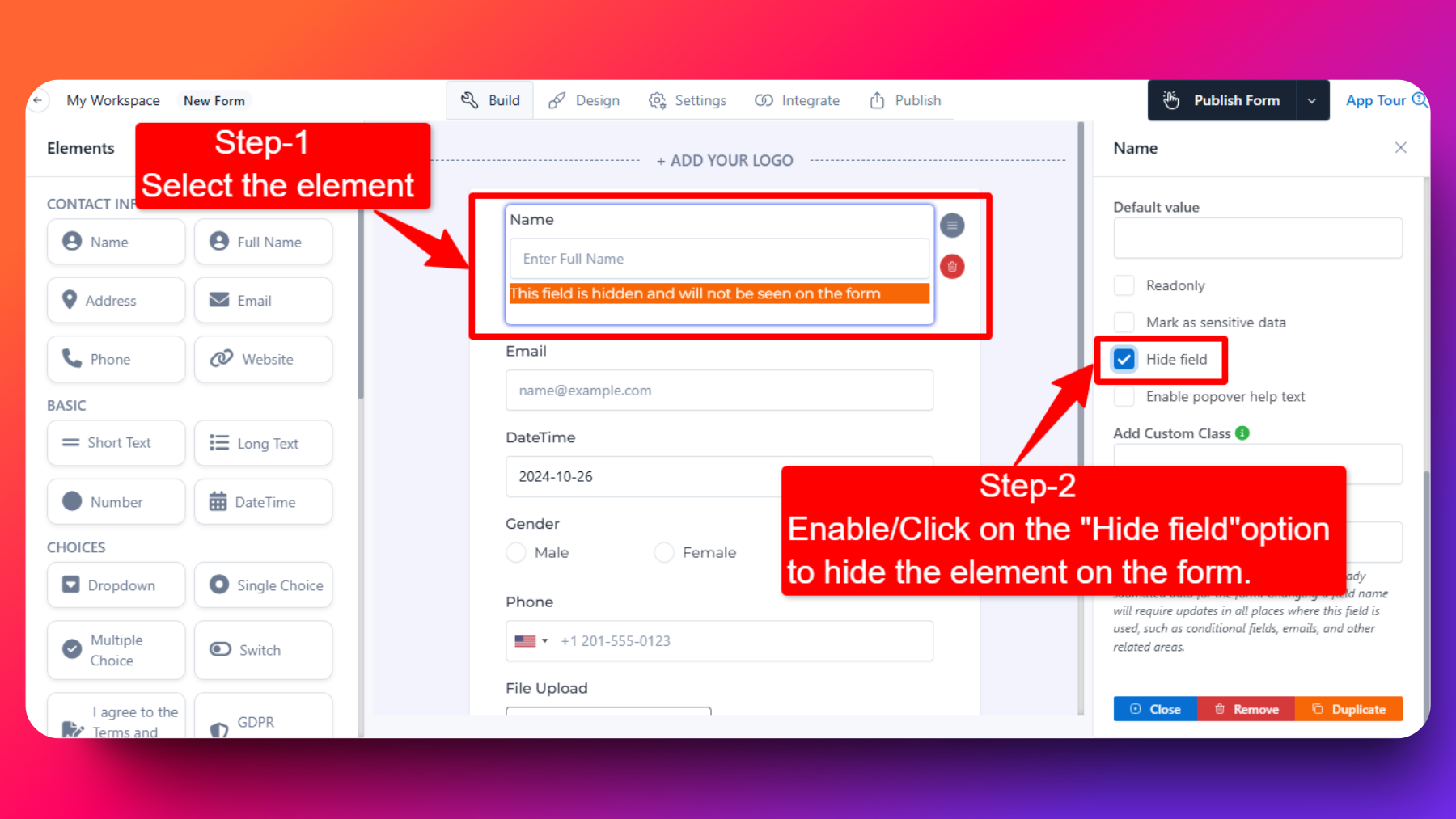
Select the field
- Click on the field or element in your form that you want to hide.
Open the field settings
- Once selected, the field's settings / customization panel opens on the right-hand side of the form builder.
Find the "Hide field" option
- Scroll through the settings panel until you see the Hide field option.
Enable "Hide field"
- Check or enable the Hide field option.
✅ That's it - the field will no longer appear on your live form.
How to Know a Field Is Hidden
Once the option is enabled, FormNX marks the field for you inside the form builder. You will see this message right below the hidden field:
This field is hidden and will not be seen on the form.
This label appears only in the form builder so you always know which fields are hidden while you are editing. Respondents never see the field or this message on the live form.
How to Unhide a Field
To make the field visible again:
- Click on the hidden field in your form builder.
- Open the settings panel on the right-hand side.
- Find the Hide field option.
- Uncheck / turn off the option.
The field becomes visible on your live form again, along with all of its existing settings.
Hiding a field is a permanent on/off setting - the field stays hidden for every respondent until you turn the option off. If you instead want a field to appear only when someone gives a particular answer, use conditional fields.
Hidden fields are often paired with pre-filling form fields via URL parameters when you want to pass a value into the form without showing it to the respondent.