How to Collect and Verify Email Addresses in Google Forms
To collect email addresses in Google Forms:
- Open the form and click the Settings tab.
- Click Responses to open it.
- Set Collect email addresses to Verified or Responder input.
Verified uses the respondent's Google account, so they must sign in. Responder input lets anyone type an email and only checks its format. To verify an email with a code, Google Forms needs an add-on.
How do I collect email addresses in Google Forms?
Turn on one setting. Google Forms doesn't collect or record email addresses until you do.
- Open your form and click the Settings tab.
- Click Responses to open it.
- Next to Collect email addresses, choose Verified or Responder input.

Google then adds a required email question at the top of the form. To collect emails in every new form, set Collect email addresses by default. It's in Settings, under Form defaults.
What does Verified mean in Google Forms?
Verified means the email comes from the respondent's Google account. They must sign in, and they can't type a different address. Responder input means they type any email, with no sign-in.
| Verified | Responder input | |
|---|---|---|
| Sign-in needed | Yes, a Google account | No |
| Who can respond | Only people with a Google account | Anyone with the link |
| Typos and fake emails | Can't happen | Get through if they look right |
| Best for | Schools and companies on Google Workspace | Customers, events, public sign-ups |
Here is what respondents see. With Verified, they get a tick box that says "Record [their email] as the email to be included with my response".
With Responder input, they type their email in a box. Google rejects "jane@gmial", but it accepts the Gmail typo "[email protected]" because it looks like a real address.
How do I require and validate an email in Google Forms?
The Collect email addresses setting already makes the email required. Add your own email question only if you want it lower in the form or with a different label:
- Add a Short answer question and call it "Email address".
- Click the three dots at the bottom right, then Response validation.
- Set the first box to Text and the second to Email.
- Type an error message, like "Enter a valid email, like [email protected]".
- Turn on Required.

The option is called Email. Some tutorials call it "Email address", but you won't find that name in the menu. Like the setting, Google Forms email validation only checks the format, not the inbox.
Can Google Forms verify an email address?
No. Google Forms can't send a code or a link to check that someone owns the email they typed. Google's own help page says there is "no way to verify the email address that the users enters".
Verified only proves that the person has a Google account. Responder input and response validation only check the format. So all of these still reach your responses:
- Typos, like [email protected].
- Throwaway inboxes, made to catch one email and then forgotten.
- Someone else's email, typed in on purpose.
Each one is a lead, guest or customer you can't reach.
What do people add to Google Forms to verify emails?
An add-on or another tool from outside Google. Here are the usual options, and the catch with each one.
| Option | How it works | The catch |
|---|---|---|
| FormFlowpro add-on | Emails a code before the form opens | Email codes are in its Pro plan, $49 a year. Respondents fill in the form on FormFlow's page, not your Google Form. The install asks for 7 permissions, including sending email as you. |
| Zapier + an email checker (such as NeverBounce) | Checks each address after submit | The bad address is already in your responses. Checking it is one step and acting on the result is another, but Zapier's free plan allows only one. So you need a paid plan, from $19.99 a month billed annually. The checker also charges for each address. |
| Apps Script | Runs code when a response arrives | It can email the person but can't stop the response. You keep the code working. |
| Verified sign-in | Uses the Google account email | People without a Google account can't respond. |
None of them stops a throwaway inbox before it reaches your responses.
One form can need three tools from three vendors. An add-on sends the code, a Zap checks the address and a script sends the follow-up. That is three logins, three bills and three support teams to ask when a code stops arriving.
Our guide to Google Forms add-ons covers what installing one involves.
Verify emails without add-ons: Google Forms vs FormNX
Every workaround above lets a bad address in first or moves people to another page. In FormNX, email verification is two tick boxes on the Email field. The code goes out before the form submits, on your own form. Nobody needs a Google account.
That suits registrations, lead forms, giveaways and sign-ups, anywhere a fake email means a person you can't reach.
| What you want | Google Forms | FormNX |
|---|---|---|
| Collect email addresses | Yes | Yes |
| Reject emails in the wrong format | Yes | Yes |
| Send a code before the form submits | No, add-on needed | Yes, on paid plans |
| Respondents verify on your own form | No, the add-on uses its own page | Yes |
| Verify without a Google sign-in | No | Yes, on paid plans |
| Block throwaway (disposable) emails | No | Yes, on paid plans |
| Hold a multi-page form until the email is verified | No | Yes, on paid plans |
| Tools to set up | Form + add-on, or Zapier + a checker | One form |
Collecting emails and checking their format is free in FormNX. Codes and disposable-email blocking come with Pro, from $19 a month or $190 a year. That one plan replaces the add-on, the Zap and the checker, with priority live chat and email support.
How to turn on email verification in FormNX
Add the Email field from Contact info in the form builder, then:
- Click the Email field to open its settings.
- Tick Email Verification (OTP), just below the Is Required? switch.
- Tick Block Disposable Emails below it, to turn away throwaway inboxes.
- Click Publish Form.
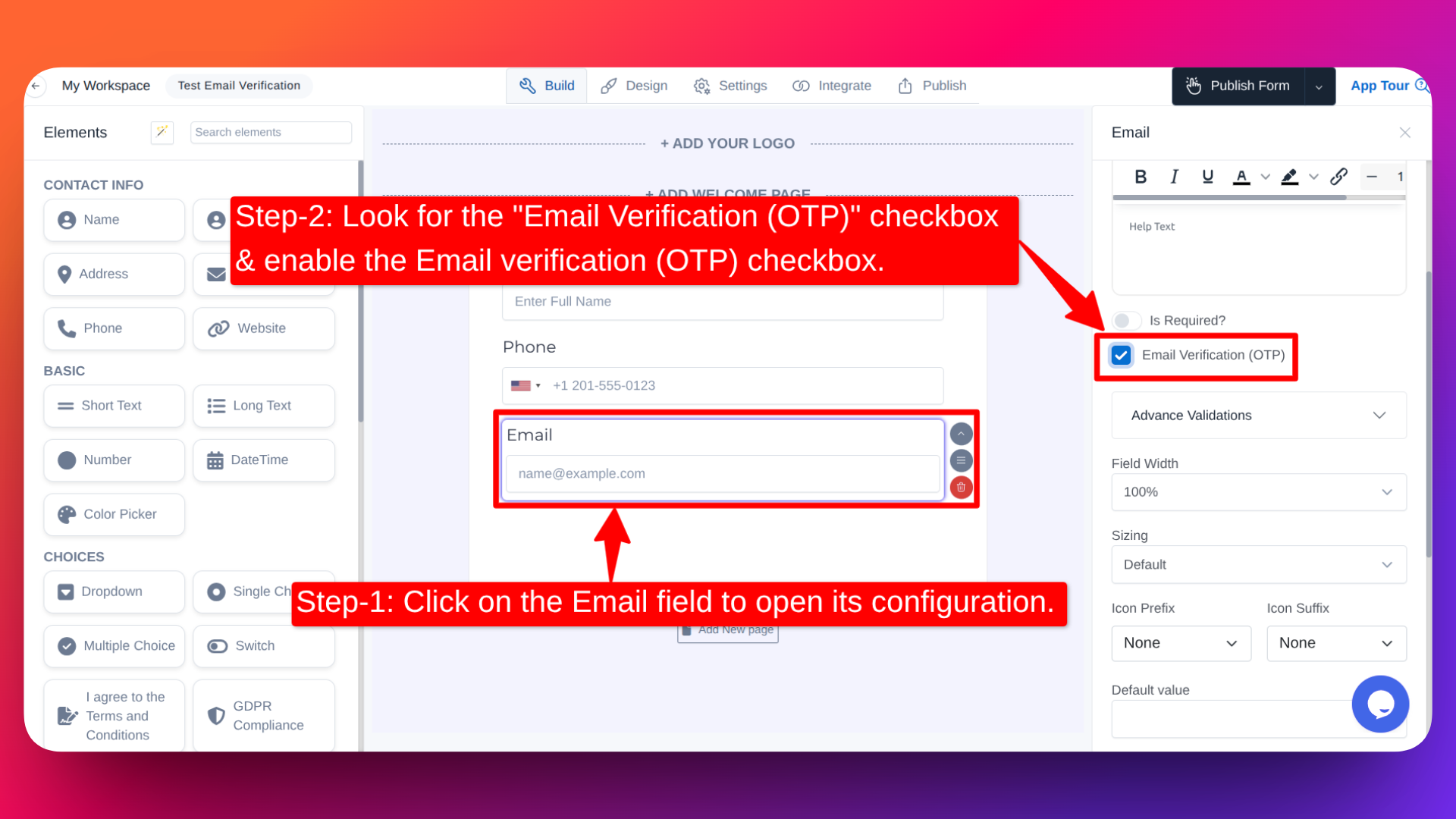
For every setting, with screenshots, see the Email Verification (OTP) documentation.
What your respondents see
A Send Verification Code button appears under the email box. FormNX emails them a 4-digit code in your form's language. They type it in, see Email Verified, and can submit.
Until then the form says "This field requires verification to continue." A throwaway address gets "Please use a real email address. Disposable emails are not allowed."
The code works for one hour, and they can ask for a new one after 60 seconds. Connect your own SMTP server and the code comes from your address.
Start faster
- Use a template. The OTP registration form template already has email verification on.
- Bring your Google Form. In FormNX, click New Form, then Import from Google Forms. Paste your form's public link, and FormNX copies its questions into a new form.
- Block throwaway inboxes. The Block Disposable Emails documentation shows each step with screenshots.
- See the feature. The email verification feature page sums up what it does and which plans include it.
Real emails, no add-ons
Check every email with a code before the form submits, and turn away throwaway inboxes, all from the Email field.
Try FormNX freeFree plan available. Email verification is on paid plans.
Does Google Forms show your email?
Only to the form owner, and only if the form collects email addresses. The owner and any editors then see your email next to your answers. Other respondents don't, unless the owner shares the responses.
Signing in doesn't share your email by itself. Limit to 1 response makes you sign in, for example. Your email is still recorded only if Collect email addresses is on.
You can't hide your email on a form set to Verified, because Google adds it for you. With Responder input you choose what to type. If the form doesn't collect emails, there's nothing to hide.
Common problems with email collection
| What happened | How to fix it |
|---|---|
| Your form asks for email twice | Collect email addresses is on and you added your own email question. Delete the question or set the setting to Do not collect. |
| "Send responders a copy" is greyed out | It shows "Requires Collect email addresses". Turn that on first. Receipts are covered in our email notifications guide. |
| Respondents can't find where to type their email | With Verified there's no box to type in. They tick the box that records their Google email. |
| Typos and fake emails in your responses | Google only checks the format. Stopping them needs a verification code, which Google Forms doesn't have. |
To compare the two builders in full, see the Google Forms alternative page.


 Reviews on Trustpilot