Email OTP Verification for Forms
Send a 4-digit email verification code (OTP) and require respondents to verify their email before submitting. Stops fake emails, reduces bounces, and keeps every address in your data real.
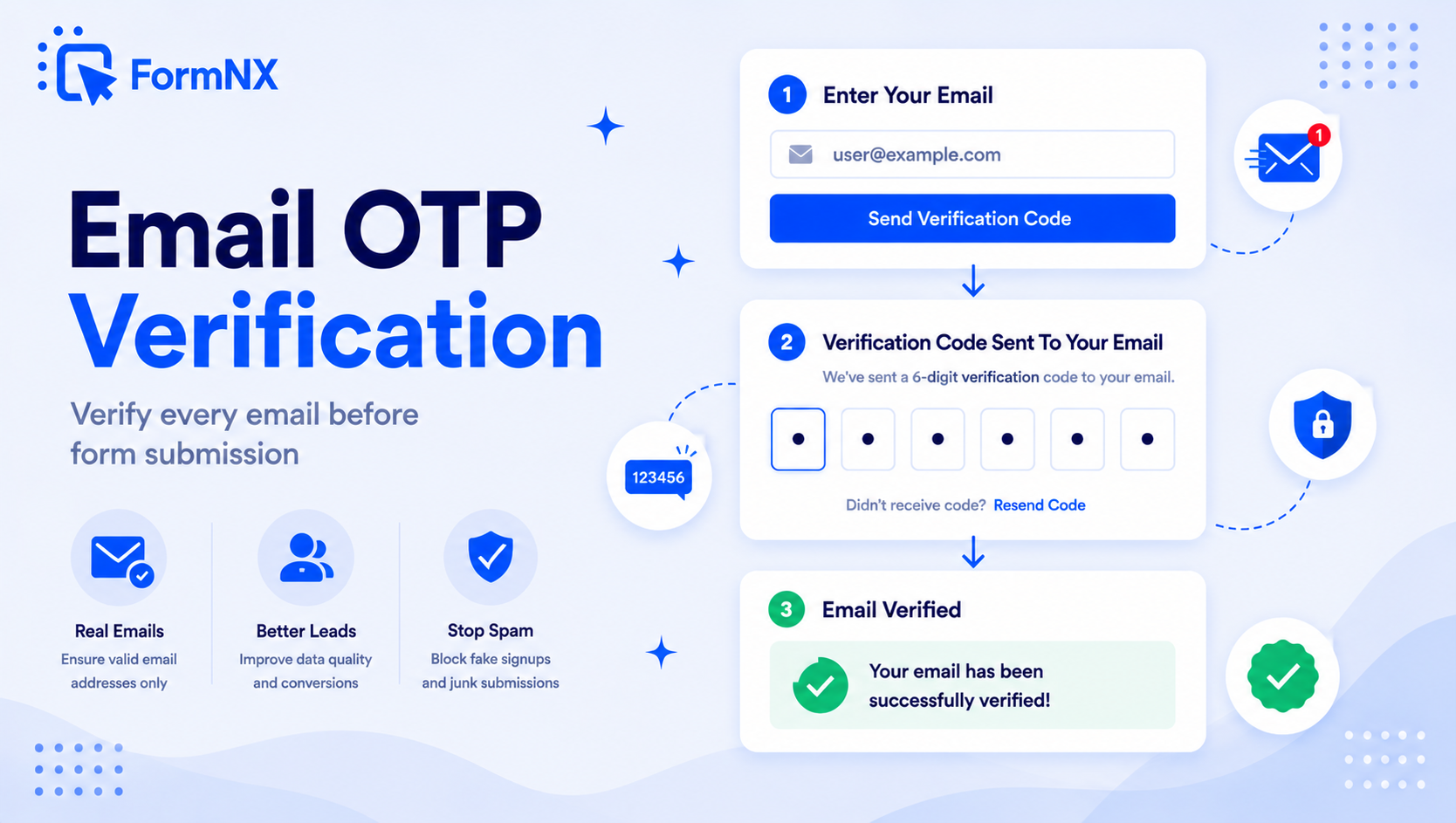








































What makes it essential for your forms
Why Use Email Verification (OTP)?
Eliminate Fake & Typo Emails
Bots, fake submissions, and accidental typos like "@gmial.com" all fail the verification step. Only emails that actually receive the code can complete the form.
Cut Email Bounce Rates
Every collected email is confirmed deliverable, so your newsletter, onboarding sequences, and follow-ups land in real inboxes instead of bouncing.
Works on Multi-Step Forms
On multi-page forms, the respondent cannot move to the next step until the email is verified. Catches bad emails early instead of at final submit.
Multi-Language Verification Email
The OTP email - subject, greeting, code label, and supporting copy - is automatically sent in the same language as your form. No extra setup.
Forgiving for Real Respondents
Respondents can re-request a code, change their email, or take up to one hour to enter the code. No friction for legitimate users.
Pairs with Disposable Email Blocking
Combine OTP with FormNX disposable email blocking to stop both throwaway domains (Mailinator, 10MinuteMail) and unverified addresses in one go.
Get up and running in minutes
How to Use Email Verification (OTP)
Enable OTP on the Email Field
Respondent Enters Their Email
They Receive a 4-Digit Code
Form Submits Only After Verification
What Is Email OTP Verification?
Email OTP verification is a one-time-password check that confirms a respondent actually owns the email address they entered on your form. When the respondent types their email, FormNX sends them a unique 4-digit email verification code. They have to enter that code back into the form before they can submit. If the code does not match, the form will not accept the submission.
It is the same email verification code pattern Google, Microsoft, and most modern apps use to confirm new sign-ups - now available as a one-click checkbox on every Email field in your FormNX form.
Why Every Form Needs an Email Verification Code
Every fake email in your list costs you in three ways: it inflates your CRM with leads you cannot reach, it pushes up your email-marketing bounce rate (which damages sender reputation), and it makes it harder to spot the real prospects in your data. Format validation alone cannot stop a real human typing a fake-but-validly-formatted email like "[email protected]" - only an email verification code sent to the inbox can.
FormNX bakes OTP verification right into the Email field. There is no third-party verification service to integrate, no extra cost per email, and no separate setup. One checkbox turns any FormNX form into a full OTP form on any plan that supports it.
Verify Email Form vs Account Sign-Up: Why It Matters Outside of Login
Most articles about "verify email form" or "email verification" focus on account creation. But the same protection is just as valuable on lead generation forms, newsletter signups, contest entries, event registrations, and customer support contact forms - anywhere a fake email costs you a real follow-up. Adding email OTP verification to those forms means every contact you collect is real and reachable, not a typo or burner address.
How FormNX Email OTP Compares to Disposable Email Blocking
FormNX offers two complementary email-quality features:
- Block Disposable Emails - rejects emails from temporary providers (Mailinator, 10MinuteMail, Guerrilla Mail, etc.) based on the domain. Fast, no user friction.
- Email Verification (OTP) - sends a 4-digit email verification code to the email and requires the respondent to enter it back. Confirms the inbox is real and accessible to that person.
For maximum data quality, enable both. Disposable email blocking removes throwaway domains upfront, and OTP verification confirms the remaining addresses are reachable by the actual respondent.
Common use cases where Email Verification (OTP) excels
What You Can Build with Email Verification (OTP)
Don't just take our word for it
Hear from our customers
"I've been looking for an alternative to Jotform - one that would accept payments directly from the form. The learning curve is short, supported by great customer service which never let me down."


"There are super features in this form creator. They REALLY took a lot of time to create a fantastic program. I was using another form creator but switching a lot of my forms to this application. The tech support is amazing."

"Easy to build forms from scratch with a long list of fields. Don't want to start from scratch? No problem — many templates available. Every integration I can think of is available. Customer support is quick and very helpful."


Email Verification (OTP): Frequently Asked Questions
-
What is email OTP verification?
Email OTP verification is a one-time-password check that confirms a person actually owns the email address they entered. The form (or app) emails them a unique 4-digit email verification code, and they have to type that code back in before they can proceed. It is the standard pattern used by Google, Microsoft, and most modern apps to verify a new email - and FormNX makes it available as a one-click checkbox on every Email field.
-
How does email OTP verification work in FormNX?
When you enable Email Verification (OTP) on the Email field, FormNX sends a 4-digit code to whatever email the respondent types in. The respondent has to enter that code back into the form to verify ownership of the email. Only after the code is verified can they submit the form, or move to the next step on multi-page forms.
-
Is Email Verification (OTP) free?
Email Verification (OTP) is included on FormNX Pro plans. The free plan still gives you unlimited forms and responses plus the standard Email field with format validation, so invalid addresses are caught - OTP adds the extra step of proving the respondent actually controls that inbox.
-
Does email OTP verification work with multi-step forms?
Yes. On multi-step / multi-page forms, the respondent cannot move past the page containing the Email field until they have verified the code. This catches bad emails at the start instead of letting respondents fill out an entire form before failing at the final submit.
-
What language is the verification email sent in?
The OTP verification email is sent in the same language as your form. Whatever language you have selected in the form builder determines the language of the email - including the subject line, greeting, code label, and supporting copy. No separate translation setup is required.
-
How long is the OTP code valid?
The code is valid for one hour after it is sent. Respondents who do not receive the code or take too long can request a new one with a single click. They can also change their email address mid-form and request a fresh code for the new address.
-
How is OTP verification different from blocking disposable emails?
Block Disposable Emails rejects emails from known throwaway providers (Mailinator, 10MinuteMail, etc.) based on the domain - it is fast and adds zero friction for real users. Email Verification (OTP) goes further by confirming the respondent actually owns the inbox they entered. Use both together for maximum data quality.
-
Is email OTP safe?
Email OTP is a solid ownership check, but it is worth being clear about what it does and does not prove. It confirms that whoever filled in your form can open that inbox right now, which is exactly what you want for lead quality, bounce reduction and stopping typo or throwaway addresses. It is not a substitute for full account security: like all one-time passwords delivered over a channel, email OTP can in principle be intercepted if the inbox itself is compromised, and no OTP method is immune to phishing, where a person is tricked into passing the code on. For form submissions - which is what FormNX uses it for - that risk profile is entirely appropriate. For protecting a high-value login, security guidance generally favours an authenticator app or a hardware key over email or SMS codes - MDN Web Docs notes that SMS and email OTP can both be intercepted and that all OTP methods remain vulnerable to phishing. FormNX limits the exposure by expiring each code after one hour and tying it to the single submission in progress.
-
How do I get an email OTP verification?
If you are filling in a form, the code comes to you: enter your email address, then check that inbox for a message containing a 4-digit verification code and type it back into the form. Check your spam or promotions folder if it does not arrive within a minute, and use the resend option rather than submitting the form twice. If you are the one building the form, you do not need to write any code or sign up for a verification service - open the Email field in the FormNX builder and tick the Email Verification (OTP) checkbox. FormNX generates the code, sends the email in the same language as your form, and blocks submission until the code is entered correctly.
-
What is an OTP email address?
It is not a special type of address - an OTP email address simply means the ordinary email address that a one-time password gets sent to. When a form or app asks you to verify, it emails a short single-use code to the address you entered, and you type that code back to prove the inbox is yours. Some people use the phrase to mean a throwaway or temporary inbox opened purely to receive verification codes, which is exactly the behaviour email OTP is designed to discourage. That is why FormNX pairs OTP verification with disposable email blocking: OTP proves the inbox is reachable, and disposable blocking rejects known temporary domains such as Mailinator and 10MinuteMail before a code is ever sent.
-
Can you add email or OTP verification to Google Forms?
Not true OTP. Google Forms can collect an email address and, on Workspace accounts, restrict a form to signed-in Google users (one response per account) - but it cannot send a one-time 4-digit code to verify that the person actually owns the email they type in, so a respondent can still enter a fake-but-valid address like [email protected]. FormNX adds real email OTP verification to any form: a 4-digit code is emailed and must be entered back before the form submits, so every address you collect is confirmed reachable - something Google Forms cannot do natively.
Need More Help?
Check out the detailed documentation for Email Verification (OTP)
View DocumentationReady to Use Email Verification (OTP)?
Start building professional forms with this powerful feature today
Create Your Free AccountOther features that work great with Email Verification (OTP)
More Related Features
Block Disposable Emails
Block emails from throwaway email providers in one click. FormNX checks every submitted email against an updated disposa...
See How It WorksSpam Protection
Block bots without breaking your forms. Built-in CAPTCHA, invisible honeypot, and disposable email blocking on every for...
See How It WorksDuplicate Submission Check
Block repeat submissions by IP address or by matching a specific field value. Keep your data clean without any manual de...
See How It Works
- Alternatives
- Jotform Alternative
- Typeform Alternative
- Google Forms Alternative
- SurveyMonkey Alternative
- Contact Form 7 Alternative
- Paperform Alternative
- Microsoft Forms Alternative
- Fillout Alternative
- Tally Forms Alternative
- Gravity Forms Alternative
- Cognito Forms Alternative
- Formstack Alternative
- All Alternatives
- Pricing Guides
- Jotform Pricing
- Typeform Pricing
- SurveyMonkey Pricing
- Use Cases
- No-Code Form Builder
- Online Survey Builder
- AI Form Builder
- Online Quiz Maker
- Job Application Form Builder
- Order Form Builder
- Screen Printing Order Form
- Wholesale Order Form
- WordPress Form Builder
- Contact Form
- Nonprofit Form Builder
- Squarespace Form Builder
- Wix Form Builder
- Webflow Form Builder
- Framer Form Builder