Form Timer
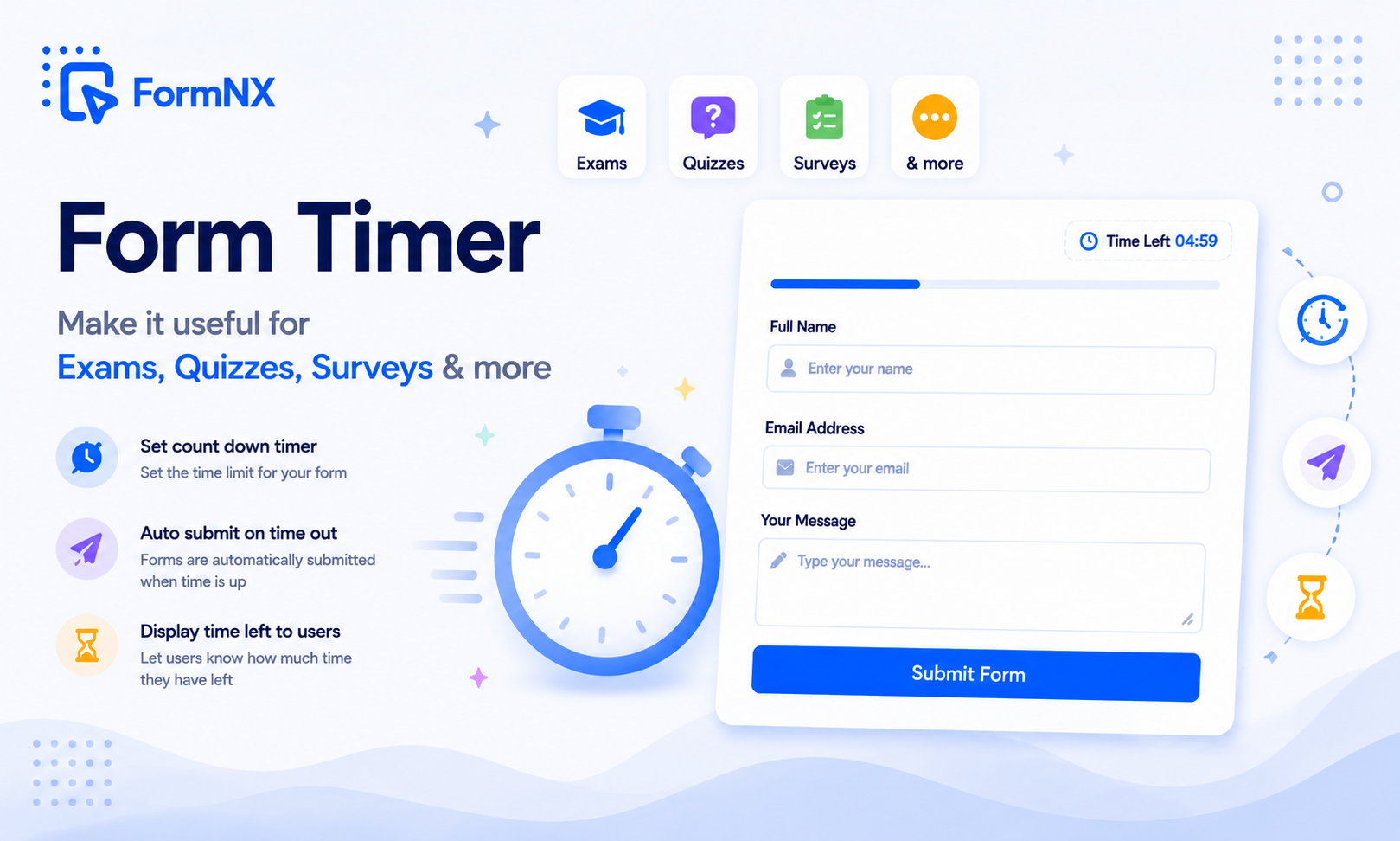
Add a countdown time limit to any form or quiz. Set a whole-form timer or per-page timers, auto-submit when time runs out, and record how long each person took - all built into the form builder, no separate add-on.







































The gap between a deadline and a fair, enforced time limit
Putting a Real Time Limit on a Form Is Harder Than It Looks
A Deadline Nobody Actually Enforces
Telling people they have twenty minutes does nothing if the form keeps accepting answers. Without an enforced countdown, some respondents keep going long after the time should have run out.
Answers Get Lost When Time Runs Out
Many timer tools fail at the one moment that matters: the clock hits zero and the responses are never saved. The respondent finishes the exam and the work simply disappears.
No Per-Page or Per-Question Time Limits
Most timers only cap the whole form. There is no way to give each section or each question its own countdown for a paced reading test or a one-question-at-a-time quiz.
Timers That Start Before the Person Is Ready
A timer that starts the moment the page loads is unfair. The countdown can run while someone is still reading the instructions, or on a shared link before they even choose to begin.
A Bolt-On Timer Is One More Thing to Manage
Wiring a separate timer tool onto your form means another login, another subscription, and another integration that can break on the exact day of the test.
No Record of How Long People Took
A plain time limit tells you nothing about pace. Without a stored time-taken value you cannot see who rushed, who used every minute, or how long a survey really takes.
A countdown built into the form, not bolted on
What a Built-In Form Timer Does for Your Quizzes, Exams, and Surveys
Whole-Form Countdown
Set a total time limit in minutes. A live countdown shows on the form and it auto-submits the moment time runs out, capturing every answer already entered.
Per-Page and Per-Question Timers
Give each page its own limit in seconds. The form auto-advances to the next page when a page runs out and submits on the last one - ideal for paced reading tests and one-question-at-a-time quizzes.
Auto-Submit With No Lost Answers
When the clock hits zero the form submits whatever the respondent has entered so far, using the same reliable submit path as the Submit button. Nobody loses their work.
Fair Start on the Welcome Page
The countdown starts only when the respondent clicks Start on the welcome page, never on page load. Shared links and embeds stay safe and every taker gets the full time.
A Countdown That Warns as Time Runs Low
The timer shows in your form colours and turns red in the final stretch, so respondents feel the urgency without a jarring pop-up interrupting them.
Time-Taken Recorded on Every Submission
FormNX stores how long each person took, shows it on the response, and displays it on the quiz score card, so you can see pace and not just the score.
Turns Quiz Mode Into a Timed Exam
Combine the timer with FormNX Quiz Mode auto-grading, correct answers, and grade bands to run a fully timed online exam or graded quiz in one tool.
Works on Any Form, No Add-On
The timer is native to the builder, so it works on quizzes, exams, surveys, and timed applications, with nothing extra to install and no separate tool to manage.
Get up and running in minutes
How to Use Form Timer
Turn On the Timer in Your Form Settings
Set a Whole-Form or Per-Page Time Limit
Respondent Clicks Start and the Countdown Begins
Form Auto-Submits or Auto-Advances When Time Is Up
Step-by-step tutorial
Watch: add a countdown timer in under 2 minutes
What Is a Form Timer?
A form timer is a countdown that puts a time limit on a form, quiz, or exam and submits the responses automatically when time runs out. It is the core of any timed quiz or online test: the respondent sees how much time is left, and the moment the clock reaches zero the form is submitted so nobody keeps answering past the deadline. FormNX builds the timer directly into the form builder, so you set a limit with a single toggle. Because the timer is part of the builder itself, there is nothing extra to install and no separate add-on to manage.
Whole-Form Timer: One Countdown for the Whole Quiz or Exam
The simplest setup is a whole-form timer. You set a total time limit in minutes, and a live countdown appears on the form once the respondent begins. As the minutes tick down the countdown stays visible, and when it reaches zero FormNX auto-submits the form with every answer already entered. This is exactly what a timed quiz, a recruitment test, or a timed survey needs: one clock for the whole session, enforced automatically, with no reliance on the respondent remembering to hit Submit before the deadline.
Per-Page and Per-Question Timers
Most timer tools stop at a whole-form limit. FormNX also gives each page its own countdown, measured in seconds. When a page runs out of time the form auto-advances to the next page, and on the final page it submits. Because FormNX can put a single question on its own page, a per-page timer becomes a per-question timer - the format used for speed quizzes, paced reading-comprehension tests, and quiz-show rounds where each question gets a fixed number of seconds. This per-page and per-question control is the piece that Google Forms timer add-ons and even Microsoft Forms do not offer.
Auto-Submit When Time Runs Out, Without Losing Answers
The single biggest complaint about Google Forms timer add-ons is lost answers: the clock hits zero and the responses are never recorded. FormNX auto-submit runs through the same reliable path as the Submit button, so it captures whatever the respondent has already entered and stores it as a normal submission. On a whole-form timer, zero triggers a submit. On per-page timers, zero advances to the next page and the last page submits. Either way, work is saved, not discarded.
One Timer, However You Share the Form
Because the timer is built into the form itself, it travels with the form everywhere you publish it - a shared link, a website embed, a popup, or a form opened in a classroom. There is no separate timer tool to configure per channel and nothing extra for the respondent to install. You set the time limit once and it applies wherever someone opens the form.
Timed Quizzes and Online Exams With Quiz Mode
The timer pairs directly with Quiz Mode. Quiz Mode handles correct answers, points, automatic scoring, and grade bands; the timer adds the time limit. Together they turn a FormNX form into a fully timed online exam or graded quiz: the respondent gets a countdown, answers within the limit, the form auto-submits at zero, and the score is calculated automatically. Multi-page exams can use per-page timers to pace each section, and single-page quizzes can use one whole-form limit.
See How Long Each Person Took
A time limit caps the maximum, but the interesting data is how long people actually took. FormNX records the time taken on every timed submission - from the moment the respondent clicks Start to the moment the form is submitted. That time-taken value is shown to you on each response and on the respondent quiz score card, so you can see who used every minute, who finished early, and how long a survey or assessment really takes in practice. It turns a plain deadline into usable pace data.
The Countdown Starts Fairly, and Warns Before It Ends
A timer is only fair if it starts at the right moment. FormNX starts the countdown when the respondent clicks Start on the welcome page, never on page load. That means a shared link or an embedded form can sit open without the clock running, and every taker gets the full allotted time from the moment they choose to begin. As time runs low the countdown changes to red so respondents feel the urgency, without a disruptive pop-up. This makes the same form safe to embed on a website, send as a link, or run in a classroom.
Timed Surveys, Assessments, and Applications
The timer is not only for quizzes. A timed survey keeps a research study consistent across participants. A timed skills assessment gives every candidate the same window. A timed application or knowledge check keeps an onboarding step moving. Because the timer works on any FormNX form and records the time taken, it fits any situation where the clock is part of the task - not just graded tests.
Common use cases where Form Timer excels
What You Can Build with Form Timer
Don't just take our word for it
Hear from our customers
"I've been looking for an alternative to Jotform - one that would accept payments directly from the form. The learning curve is short, supported by great customer service which never let me down."


"There are super features in this form creator. They REALLY took a lot of time to create a fantastic program. I was using another form creator but switching a lot of my forms to this application. The tech support is amazing."

"Easy to build forms from scratch with a long list of fields. Don't want to start from scratch? No problem — many templates available. Every integration I can think of is available. Customer support is quick and very helpful."


Form Timer: Frequently Asked Questions
-
Is the form timer free?
The form timer is included on FormNX Pro plans. The free plan gives you unlimited forms, responses and full quiz scoring - Pro adds the countdown, auto-submit and time tracking.
-
Can you add a timer to a form?
Yes. FormNX has a built-in form timer. Open the form settings, go to the Timer tab, and turn it on. You can set a whole-form time limit in minutes or a separate time limit for each page in seconds. A live countdown appears on the form and it auto-submits when time runs out.
-
How do I add a timer to a Google Form?
Google Forms has no built-in timer, so it needs a third-party add-on. If you would rather have the timer built in, you can build the quiz in FormNX instead, where the countdown, auto-submit, and per-page limits are part of the form. See the Google Forms alternative comparison for details.
-
What happens when the timer runs out?
On a whole-form timer, the form auto-submits the moment the countdown reaches zero, capturing every answer already entered. On per-page timers, reaching zero auto-advances to the next page, and the final page auto-submits. Nothing the respondent has typed is lost.
-
Can I set a different time limit for each page or question?
Yes. Switch the timer to per-page mode and set a limit in seconds for each page. Since FormNX can place a single question on its own page, per-page timers double as per-question timers - useful for speed quizzes and paced reading tests.
-
Does the countdown start as soon as the form loads?
No. The timer starts only when the respondent clicks Start on the welcome page, never on page load. This keeps shared links and embedded forms fair, since the clock does not run before the person is ready to begin.
-
Will respondents lose their answers if they run out of time?
No. Auto-submit uses the same reliable submission path as the Submit button, so it saves whatever the respondent has entered so far. Nobody loses their work when the deadline hits, which is the whole point of an enforced timer.
-
Can I make a timed quiz or online exam?
Yes. Combine the timer with FormNX Quiz Mode. Quiz Mode handles correct answers, scoring, and grade bands, and the timer adds the time limit and auto-submit, giving you a complete timed exam or graded quiz in one tool.
-
Can I see how long each person took?
Yes. FormNX records the time taken on every timed submission, from the Start click to the moment the form is submitted. The value appears on each response for you and on the quiz score card for the respondent, so you can measure pace, not just the final score.
-
Does the form timer work on surveys, not just quizzes?
Yes. The timer works on any FormNX form. Use it to keep a research survey consistent across participants, give every candidate the same window on a skills assessment, or keep a timed application moving. It is not limited to graded quizzes.
-
Which plan includes the form timer?
The form timer is available on FormNX paid plans. You can build and preview a timed form, and upgrading unlocks the timer for your live forms.
Ready to add a timer to your form?
Start building professional forms with this powerful feature today
Create Your Free AccountOther features that work great with Form Timer
More Related Features
Quiz Mode
Turn any form into a scored quiz. Set correct answers per question, assign points (per-question or a default), define yo...
See How It WorksE-Signature Forms
Add a real e-signature field to any form. Respondents draw their signature right inside the form on any device - free, n...
See How It WorksCalculation Form Builder
Build a calculation form with live totals, prices, and scores - drop a Calculation field, write a formula, and the value...
See How It Works
- Alternatives
- Jotform Alternative
- Typeform Alternative
- Google Forms Alternative
- SurveyMonkey Alternative
- Contact Form 7 Alternative
- Paperform Alternative
- Microsoft Forms Alternative
- Fillout Alternative
- Tally Forms Alternative
- Gravity Forms Alternative
- Cognito Forms Alternative
- Formstack Alternative
- All Alternatives
- Pricing Guides
- Jotform Pricing
- Typeform Pricing
- SurveyMonkey Pricing
- Use Cases
- No-Code Form Builder
- Online Survey Builder
- AI Form Builder
- Online Quiz Maker
- Job Application Form Builder
- Order Form Builder
- Screen Printing Order Form
- Wholesale Order Form
- WordPress Form Builder
- Contact Form
- Nonprofit Form Builder
- Squarespace Form Builder
- Wix Form Builder
- Webflow Form Builder
- Framer Form Builder