Recruitment Form Templates
Browse FormNX's free recruitment form templates and streamline hiring - no code required. Each recruitment form is fully customizable, mobile-ready, and quick to share, capturing candidate details, work history, education, and role-specific questions. Use them as a job application form, employment or recruitment application form, CV or resume collection form, online interview questionnaire, or recruitment agency registration form. Add conditional logic, collect documents, and get instant notifications when a candidate applies. Pick a recruitment form template below, customize it to your role, and start collecting applications online in minutes.


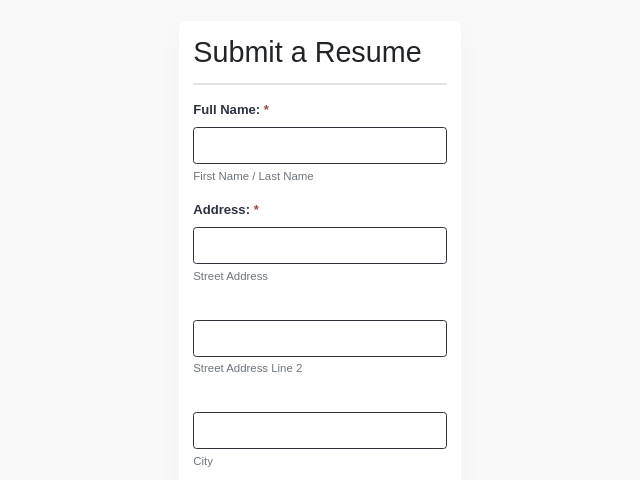
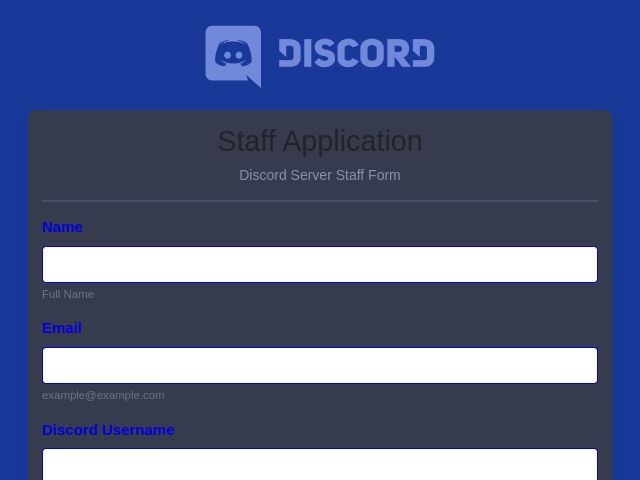
About the Recruitment Form Template
What Are Recruitment Forms?
Recruitment Forms are organized documents used by HR departments and recruiters to collect information from individuals seeking employment efficiently. These forms are essential for organizing and standardizing the hiring process and simplifying the evaluation and selection of candidates.
Why Do You Need a Form for Your Recruitment Process?
A well-structured recruitment form can have a significant impact on your hiring strategy, such as:
- A well-designed form can make it easier and more convenient for candidates to apply and streamline the recruitment application process.
- Increase efficiency as it provides a systematic approach to collect and organize applicant information.
- A concise and clear form enhances your company's brand and attracts more qualified applicants.
- A recruitment form promotes fairness and eliminates bias in the recruitment process.
Who Uses These Recruitment Forms?
- HR Departments: For managing end-to-end recruitment processes within organizations.
- Small and Medium-sized Enterprises (SMEs): To create a systematic hiring process that does not require a huge HR department.
- Recruitment Agencies: To streamline the hiring process for a large number of clients from various industries.
- Start-ups: Build teams fast and efficiently with the right skills.
- Educational Institutions and Non-profits: To recruit staff and volunteers in an organized manner.
HR teams can pair these with our HR form templates for the full employee lifecycle.
What Information needs to be collected in Recruitment Forms?
A well-designed recruitment form should collect information such as:
- Personal Information of the applicants (Name, Age, Gender)
- Applicant's Contact Information (Email, Phone Number, Address)
- Educational Background
- Work Experience
- Skills
- References
- Availability
- Position Applied For
- Upload Resume
- Signature
- Use conditional logic to show role-specific questions based on the position a candidate selects.
Different Types of Recruitment Forms available in FormNX
- Job Application Form
- Resume Collection Form
- Employment Application Form
- Online Interview Questionnaire Form
- CV Application Form
For more candidate-facing forms, browse our job application form templates
Tips to Make Your Recruitment Form Effective
- Use simple and clear language and avoid technical terms.
- Keep the form concise.
- Show relevant fields that are only necessary for essential information.
- Customize your forms to meet the specific needs of the job.
- Include a Progress Bar to inform applicants of their progress in the form.
- Assure applicants that their information is safe and will be treated with confidentiality.
- Use clear field labels to avoid any confusion.
- Break the form into different sections and add headings for the section (Personal Information, Education Background, Experience and skills, etc.).
- Add images/logos of your company to give a professional look.
How do I create a recruitment form?
Follow the steps below to create a recruitment form:
Step 1: Log in to your FormNX account.
Step 2: Choose from the existing template or start from scratch to create recruitment forms.
Step 3: Determine what you want to achieve with the form.
Step 4: Keep the design of your form simple and user-friendly.
Step 5: State the position for which the candidate is applying, and also include information about the role of the position.
Step 6: Include questions to get personal details like name, address, email, phone number, and any other relevant details required for the recruitment process.
Step 7: Include a field for candidates to upload a resume or cover letter.
Step 8: Make sure each field is clear and easy to fill out. To avoid any type of confusion, use simple language.
Step 9: Choose how will you get a notification when someone submits the form. You will get an email or connect it to other tools you use to get notified.
Step 10: Test the form to make sure it works well. Fill it out yourself to see if everything is smooth.
Step 11: Publish or share the form where you want to share according to your needs.
What are the benefits of an online Recruitment Form?
An online Recruitment form offers several benefits for both employers and job seekers, such as:
Benefits for Employers/Companies
- Streamlines the recruitment process.
- Increase efficiency and save time in the hiring process.
- Offers cost savings by reducing the paperwork process.
- Reduces the need to travel.
- Provides an organized and systematic way to collect applicants' application information.
- Easy to store and access data.
- Enhances Data Security and Privacy.
Benefits for Applicants
- Applicants can submit applications from anywhere, at any time.
- Improved User Experience.
- Real-time notification on submission of the application.
Recruitment Form FAQs
Can I create a recruitment form in Word or Google Forms?
You can, but they can't collect CV uploads cleanly, route applications, or notify your team automatically. An online recruitment form does all three, and these templates are free to publish.
Can candidates upload their CV or resume?
Yes, add a file-upload field so applicants can attach a CV, resume, or portfolio directly with their application.
What's the difference between a recruitment form and a recruitment process form?
A recruitment form is the candidate-facing application; a recruitment process form manages the internal hiring workflow - requisitions, approvals, interview evaluations, and tracking.
Are these recruitment form templates free?
Yes, every recruitment form template here is free to use and customize on FormNX's free plan.
With FormNX, you will improve and streamline the workflow of your recruitment process. Get started today and transform your hiring journey with our efficient, comprehensive, and user-friendly recruitment templates. For the internal hiring workflow - requisitions, approvals, and tracking - see our recruitment process forms
Create your free recruitment form - customize a template, collect resumes, and start hiring faster.

 Reviews on G2
 Reviews on Trustpilot
- Alternatives
- Jotform Alternative
- Typeform Alternative
- Google Forms Alternative
- SurveyMonkey Alternative
- Contact Form 7 Alternative
- Paperform Alternative
- Microsoft Forms Alternative
- Fillout Alternative
- Tally Forms Alternative
- Gravity Forms Alternative
- Cognito Forms Alternative
- Formstack Alternative
- Wufoo Alternative
- All Alternatives
- Pricing Guides
- Jotform Pricing
- Typeform Pricing
- SurveyMonkey Pricing
- Use Cases
- No-Code Form Builder
- Online Survey Builder
- AI Form Builder
- Online Quiz Maker
- Job Application Form Builder
- Order Form Builder
- Screen Printing Order Form
- Wholesale Order Form
- WordPress Form Builder
- Contact Form
- Nonprofit Form Builder
- Squarespace Form Builder
- Wix Form Builder
- Webflow Form Builder
- Framer Form Builder