🎲 Question Bank: Show a Random Subset of Questions
What is a random subset of questions?
Instead of showing every quiz question to every respondent, FormNX can pick a limited number of questions at random from your form and show only those.
The form itself becomes a question bank. You add as many quiz questions as you like - say 50 - then tell FormNX how many of them each respondent should actually answer - say 10.
Every respondent gets 10 questions picked randomly out of your 50, and the picks are different from person to person. Two people opening the same quiz link almost never see the same paper.
Example:
- You build one quiz form with 50 quiz questions. That's your question bank.
- You turn on Show a random subset of questions and set Questions per attempt to 10.
- Respondent A sees 10 questions drawn from the bank.
- Respondent B sees a different 10 questions drawn from the same bank.
- Both are scored and graded exactly the way a normal FormNX quiz is.
Everything else - points, correct answers, feedback, scores, and grades - keeps working exactly as you'd expect. Only the set of questions shown changes.
Showing a random subset of questions is available exclusively for Pro subscribers. Upgrade to a Pro plan to unlock this feature. The rest of Quiz Mode - points, correct answers, feedback, shuffled options, scores, and grades - works on the free plan.
How to show a random subset of questions
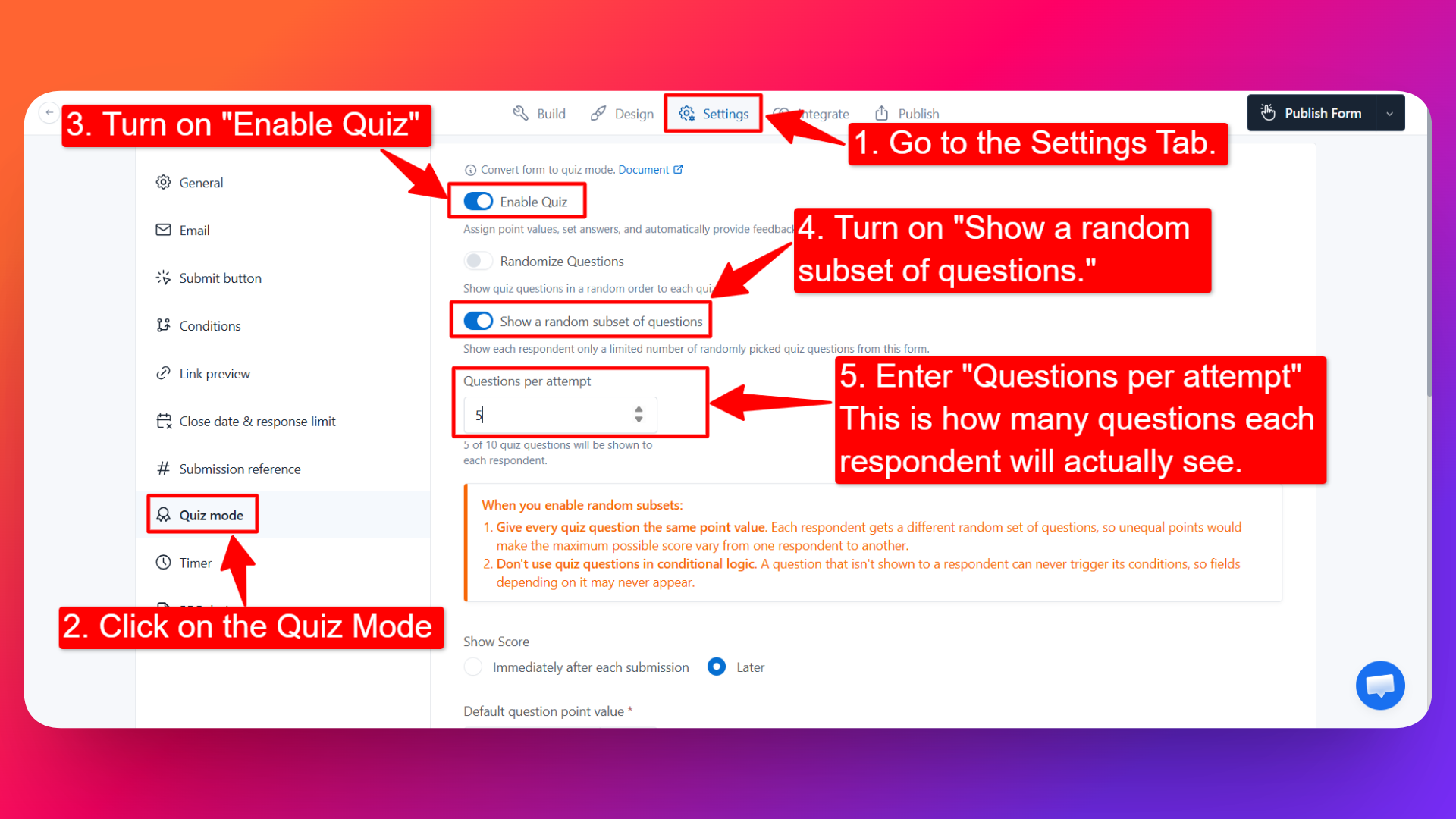
Open your form in the FormNX form builder.
Build your question bank. Add all the quiz questions you want to draw from - the more you add, the more varied each respondent's paper is. See Adding Quiz Questions & Points if you haven't added questions yet.
Go to Settings → Quiz Mode. This is the same place you enabled Quiz Mode.
Turn on "Show a random subset of questions." The description under it explains what it does: show each respondent only a limited number of randomly picked quiz questions from this form.
Enter "Questions per attempt." This is how many questions each respondent will actually see - for example,
10out of a 50-question bank.Publish your form to save the setting.
That's it. From now on, each respondent who opens the form gets their own randomly picked set of questions.
Keep Questions per attempt meaningfully lower than the size of your bank. If you set it to the same number as the total questions in the form, everyone sees every question and the feature has no effect. A bank of 50 shown 10 at a time gives far more variety than a bank of 12 shown 10 at a time.
Two things to keep in mind before you enable it
1. Give every quiz question the same point value
Each respondent gets a different random set of questions. If your questions carry different points, the maximum possible score changes from one respondent to another - one person could draw the 5-point questions while another draws the 1-point ones, and their scores would no longer be comparable.
Set the same point value on every quiz question in the bank. Then the maximum score is always Questions per attempt × points per question, identical for everybody, and your grade ranges stay fair.
2. Don't use quiz questions in conditional logic
A question that isn't shown to a respondent can never trigger its conditions. If a field is set to appear only when a particular quiz question is answered a particular way, and that quiz question isn't part of that respondent's random draw, the dependent field may never appear for them.
Keep your quiz questions out of conditional logic rules when random subsets are on. If you need conditional behaviour in the same form, base it on non-quiz fields - a department dropdown, a course selection, and so on.
Random subset vs. shuffling options
These two settings solve different problems, and they work well together:
| Setting | What it randomizes | Where you turn it on |
|---|---|---|
| Show a random subset of questions | Which questions each respondent sees, out of your whole bank | Settings → Quiz Mode |
| Shuffle Options | The order of the answer choices inside a question | Per question, in the element config |
Turn on both and two people sitting side by side get different questions and see the answer choices in different orders.
What stays exactly the same
Turning on random subsets doesn't change the rest of Quiz Mode:
- Correct answers and points are still set per question, the way you always set them.
- Scoring is automatic - FormNX scores the questions that respondent actually answered.
- Feedback for correct and incorrect answers still shows on the questions a respondent received.
- Show Score still controls whether results appear immediately after submission or later.
- Grades and remarks are still assigned from the point ranges you configured, and can still be emailed to the respondent or shown on the thank-you page.
- Admin insights - average marks, median, mark range, and the tabular submissions view - keep working across all submissions.
- Non-quiz fields (name, email, roll number, and any other regular field) are not part of the random pool. Only quiz questions are drawn from.
When to use a question bank
Random subsets are great for exams, certification tests, training checks, and practice quizzes - anywhere you want to discourage answer-sharing and keep repeat attempts fresh.
- Exams and tests - no two candidates get the same paper, so a leaked screenshot or a whispered answer is worth very little.
- Certification assessments - draw 20 questions from a 200-question bank so each certification attempt is genuinely different.
- Compliance and training checks - employees retaking a mandatory check don't just memorize last quarter's answers.
- Practice quizzes and revision - students can retake the same link again and again and get a fresh set every time.
- Recruitment screening - candidates interviewing on the same day sit different versions of the same skills test.
- Classroom pop quizzes - one form covers the whole syllabus; each student gets a short paper drawn from it.
For more ways to use quizzes, see Usecase of Quiz Mode.
Best practices for a question bank
- Make the bank much bigger than the subset. A 10-question paper drawn from 50 questions gives thousands of possible combinations; drawn from 15, far fewer.
- Keep questions equally difficult. Since every respondent draws a different paper, wildly uneven difficulty makes scores hard to compare - the same logic behind giving every question equal points.
- Cover every topic in the bank. A random draw doesn't guarantee coverage of each chapter, so keep the bank balanced across topics if you want each paper to be representative.
- Grow the bank over time. Adding questions later automatically increases variety - you don't have to change the Questions per attempt value.
- Combine with Shuffle Options for a second layer of randomization.
- Set your grade ranges against the subset, not the bank. If respondents answer 10 questions worth 1 point each, your grade bands should run over 0–10, not 0–50.
FAQs
What is a question bank in FormNX?
It's simply a quiz form with a large pool of quiz questions in it. When you turn on Show a random subset of questions, FormNX treats that pool as a bank and draws a limited number of questions from it for each respondent.
Do all respondents see the same questions?
No. Each respondent gets their own randomly picked set. That's the point of the feature - it makes answer-sharing between respondents far less useful.
How many questions can I put in the bank?
There's no limit on the number of quiz questions you can add to a form, so your bank can be as large as you want.
How do I choose how many questions each person answers?
Enter the number in the Questions per attempt field that appears once you turn on the random subset setting. If you enter 10, every respondent answers 10 questions.
Does scoring still work with random subsets?
Yes. Scores, correct/incorrect feedback, grades, and remarks all keep working exactly as they do in a normal quiz. Only the set of questions shown changes.
Why should every question have the same points?
Because each respondent gets a different random set. If points differ per question, the maximum possible score varies from person to person and scores stop being comparable. Equal points keep the maximum identical for everybody.
Can I use conditional logic with quiz questions when random subsets are on?
You shouldn't. A question that isn't shown to a respondent can never trigger its conditions, so any field depending on it may never appear. Base your conditional rules on non-quiz fields instead.
Will a respondent get different questions if they take the quiz again?
Yes - each attempt draws a fresh random set from the bank, which is what keeps repeat attempts and practice quizzes useful.
What's the difference between this and shuffling options?
Show a random subset of questions changes which questions a respondent gets. Shuffle Options changes the order of the answer choices within a question. You can use both at once.
Are non-quiz fields like name and email also randomized?
No. Only quiz questions are drawn from. Regular fields such as name, email, or roll number appear for everyone as usual.
Can I still see everyone's marks and statistics?
Yes. The submissions list and quiz insights - average marks, median, and mark range - work exactly as before.
Is showing a random subset of questions free?
No. This one is a Pro feature - you'll need a Pro plan to turn it on. Quiz Mode itself and the rest of its settings (points, correct answers, feedback, shuffled options, show score, grades, admin insights) are available on the free plan.