
Introduction
The digital signature market is projected to reach USD 13.09 billion in 2026, growing at a 19.97% CAGR through 2032, as businesses shift to paperless workflows.
If you're searching for "how to add a digital signature to PDF", "how to insert an electronic signature in PDF" or "how do I add a digital signature to a PDF" you're not alone-millions seek quick, secure ways to sign documents without printing or scanning.
Manual methods waste days and dollars, but FormNX changes that. This free form builder lets you drag-and-drop a signature field into any form, fill it out, and auto-generate a signed PDF on submission-no add-ons or extra tools needed. In this guide, get step-by-step instructions using FormNX, plus ready templates to start immediately. Save 75% on turnaround time compared to paper processes.
Why Use Digital Signatures on PDFs?
Digital signatures on PDFs cut contract turnaround by 75% and reduce manual errors by 60%, with 80% of organizations now adopting e-signatures for efficiency. They're legally binding under the ESIGN Act, work on any device, and eliminate printing costs ($4-10 per document saved).
Key benefits include instant signing, mobile compatibility, and audit trails for compliance.
| Aspect | Paper Signing | Digital with FormNX |
|---|---|---|
| Turnaround Time | 5-7 days | Instant |
| Cost per Doc | $4-10 | Free |
| Error Rate | High (60%) | Auto-validation |
| Accessibility | Office-only | Mobile/web |
FormNX makes this seamless with an e-signature form builder that embeds signatures directly into auto-generated PDFs from form submissions-no scanning required.
Methods to Add a Signature to PDF
Users searching "how to add a digital signature to PDF" have several options, but most involve trade-offs like costs or limits.
- Adobe Acrobat: Secure with certificates, but requires subscription ($10+/month).
- Online tools (Smallpdf, PDFgear): Free quick signs, yet add watermarks on exports and cap usage.
- Form builders (like Google Forms): Need add-ons; signatures don't embed natively in PDFs.
Best free method: FormNX. Drag-drop a signature field into a form, submit, and get a PDF with the e-signature baked in-unlimited, no watermarks. It beats competitors for workflows like contracts or registrations.
| Method | Pros | Cons | FormNX Edge |
|---|---|---|---|
| Adobe | Cert security | Paid ($14.99/mo ($180/year)) | Free alternative/ paid plan starts from just $15/mo |
| Smallpdf | Fast upload | Watermarks/limits | Fast, Unlimited signatures |
| FormNX | Form-to-PDF signature | None, but for PDF generation feature you need subscription | Native signature fields in forms, auto-generates signed PDFs on submission, unlimited forms/signatures |
Step-by-Step: Add Signatures with FormNX (The Complete Method)
FormNX simplifies "how to insert an electronic signature in PDF" by letting you add a signature field to any form, then auto-generate a signed PDF on submission. Sign up free at formnx.com-no credit card needed.
Start a form: Go to formnx.com, and visit the home page of FormNX and click "My Forms" tab and then click on "New Form" button to create the form. You can start creating the form from scratch or pick a template from library of templates available like consent or registration.
Add signature field: In the FormNX form builder search "Signature" element in the left panel under Elements section. You have two options:
- Drag and drop the Signature element directly into your form where it needed.
- Click the Signature element to add it at the bottom.
Customize the Signature field: Set required, add labels ("Sign here"), help text, sizing or field width.
Customize Your Form (Optional but Powerful) This is where FormNX pulls ahead of simple PDF signers-you can build logic and branding around your signature collection:
Conditional Logic: Add rules like "Show signature field only if user checks 'I agree to terms.'" This prevents accidental submissions and strengthens consent documentation.
Branding:
- Upload your company logo
- Match brand colors
- Customize the submit button text ("Sign and Submit," "Complete Agreement")
Dynamic Totals: Add a calculation form field if your contract has variable fees (signing bonus, hourly rates, project quotes) - the live calculated amount renders on the signed PDF, no manual math.
Integrations:
- Payment collection: Add Stripe for paid contracts (sign + pay in one flow)
- Webhooks: Auto-send signed PDFs to your CRM, Google Drive, or project management tool
- Email notifications: Get alerts when forms are signed
Open the PDF Builder: From left hand side bar, select My PDFs and click on New PDF. Select the form for which you want to genrate PDFs. Customize the PDF according to your needs-no design skills needed.
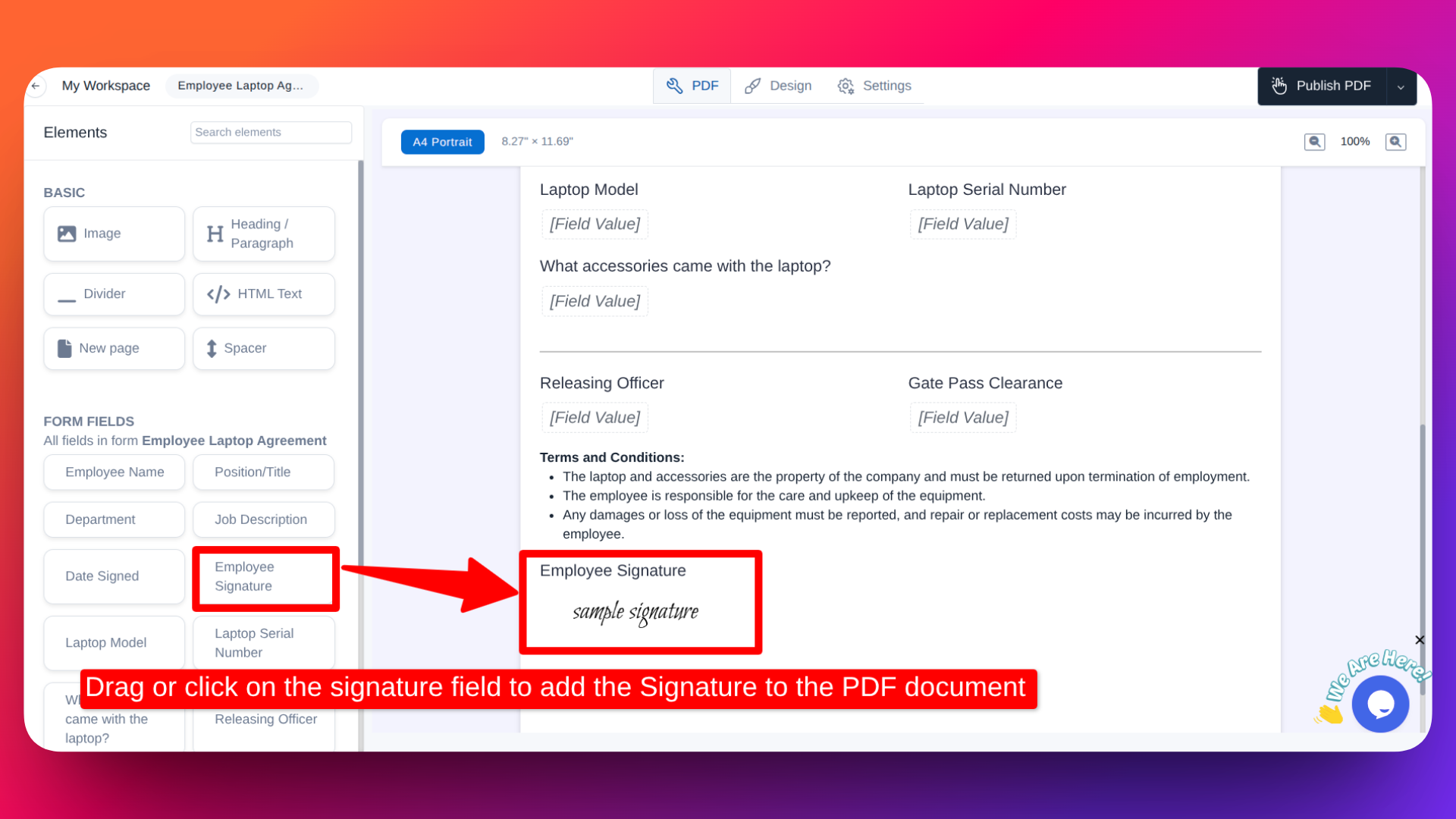
Add Signature to the PDF: Drag or click on the form fields (e.g.,signature field) to add the Signature to the PDF document.
Set Automation: You can also enable "Email to responder" and and also enable "attach PDF" inside email option to attach the PDF in the email responses for the users.
Publish & Test: Share form link. Submit test response-watch instant PDF generate and email effortlessly.
Guide: You can refer to this 👉 Documentation for detailed, step-by-step instructions on how to create customizable PDFs with Signatures for your forms and utilize the PDF feature to send automatic customized PDF documents via email to the users.
- Generate signed PDF: View submission Responses→ PDF Builder auto-embeds the e-signature to the PDFs. Download instantly-no watermarks.
Enable duplicate check to avoid resubmissions; Google ReCaptcha for spam protection.
Try it Now: Use this employee agreement template with signature ready → Employee agreement template
Templates to Get Started
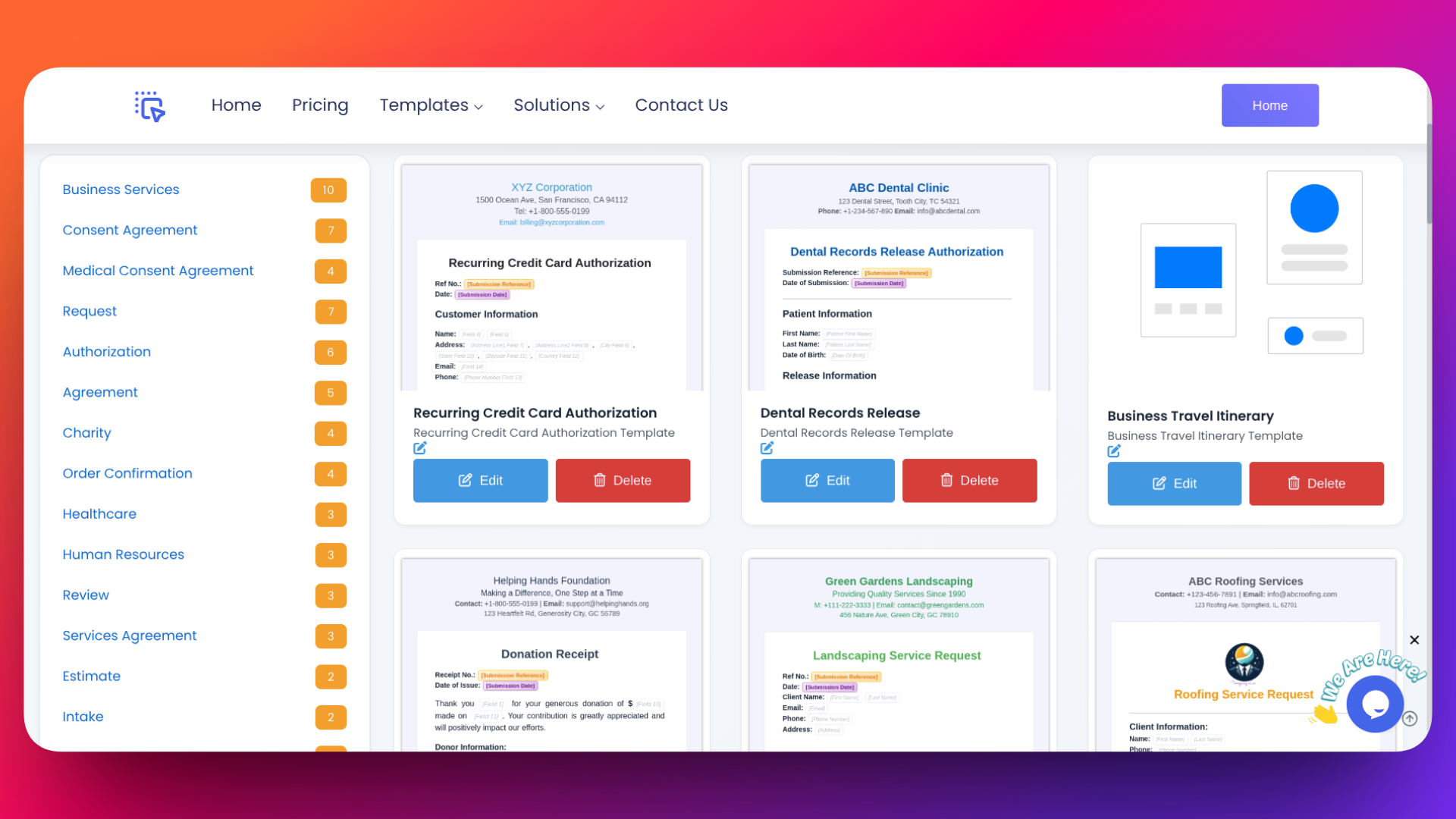
Speed up workflows with FormNX templates that include spots for signature fields-perfect for "how to add a digital signature to PDF" in real scenarios.
- Consent Forms: Add signature for approvals/privacy. Try here.
- Employee Laptop Agreement: Embed sig for asset sign-off. Try PDF template.
- Registration Forms: Event/lead capture with e-sign. Browse category.
Quick Win Guide: Effortless ESIGN-Compliant Signatures
- Pick Any Template: Start with a free, customizable template that fits your needs.
- Add Signature Field: Drag and drop the Signature field into your form.
- Save & Generate PDF: Save your form, then create a PDF version of the form.
- Insert Signature Field in PDF: Ensure the signature field added in the PDF.
- Submit & Collect Signed PDF: Submit the form and instantly receive the ESIGN-compliant, signed PDF.
Benefits:
- 100% free and fully customizable.
- No setup hassles or add-ons required (unlike Google Forms).
- Legally binding, ESIGN-compliant signatures.
Get professional document with signatures in minutes-no extra steps, no hidden fees!
FAQs
How do I add a digital signature to a PDF with FormNX?
Drag the Signature field into your form, create PDF for the form with signature field and then fill and submit the form-it auto-generates a signed PDF via the PDF Builder feature.
How to insert an electronic signature in PDF for free?
Add the Signature field in your form, create PDF for the form with signature field and then fill and submit the form, it generates a PDF with signature.
FormNX vs. Adobe or Smallpdf?
FormNX is free/cheaper with native form-to-PDF; others add costs/limits or lack integration.
Can I use it on mobile?
Fully responsive-draw signatures on phone/tablet, instant PDF generation.
FormNX vs. Google Forms for signatures?
FormNX has native fields and PDF export; Google needs unreliable add-ons.
Conclusion & Next Steps
You've now mastered how to add a digital signature to PDF using FormNX-the fastest, free way to insert electronic signatures in forms and generate signed PDFs instantly.
Start today: Sign up free, use a signature-ready template, and skip paper forever. Save 75% time, cut errors, and scale workflows without limits.
Ready to try?
👉 Build your first signed PDF form in under 2 minutes at FormNX.com
👉 You can also check out FormNX's Free AI Signature Generator tools to create unique signatures
No credit card required. Unlimited forms and signatures. Start eliminating paperwork today.