🔗 Embed forms in WordPress
This guide will show you how to embed your forms in WordPress. You can either install the official FormNX WordPress plugin (easiest - paste a form link and you're done), or paste the embed code manually into the "Gutenberg" editor, "Classic" editor, or Elementor.
Check below for steps on how you can embed your forms on a WordPress website.
🎥 Video Walkthrough
FormNX WordPress Plugin (Recommended)
The official FormNX plugin lets you drop a form into any page with just its link - no embed code, no copy-pasting scripts.
👉 Plugin & setup guide: FormNX WordPress Form Builder - Quick Start
Step-1: In WordPress, go to Plugins → Add New Plugin, search for "FormNX", then click Install Now and Activate.
Step-2: Open your form in FormNX, go to the Publish tab, and copy the form link.
Step-3: Edit the page or post where you want the form, add the FormNX Form block, and paste the link. That's it.
Once installed, the plugin gives you three ways to add a form:
| Method | How to use it |
|---|---|
| Gutenberg block | Search for FormNX in the block editor, paste your form link, and preview it live. The block toolbar has a "Change URL" option and supports wide/full alignment. |
| Shortcode | [formnx url="your-form-link"] for an inline, auto-resizing form - works in the Classic Editor and most page builders. Add height="900" for a fixed height, or type="popup" text="Contact us" to open the form as a popup button. |
| Elementor widget | Use the native FormNX Form widget with full Elementor controls, including inline/popup embed types and height settings. |
Forms can also be shown as a popup, triggered by a button click, a time delay, scroll depth, or exit intent - configurable from the block, shortcode, or Elementor widget settings.
Requirements: WordPress 6.2 or higher, PHP 7.4 or higher, and a FormNX account (the free plan works).
If you'd rather not install a plugin, you can paste the embed code directly - see the sections below.
Gutenberg Editor - Embedding forms in WordPress Gutenberg Editor
To embed forms in Gutenberg Editor follow the below steps:
Step-1: Add or Edit the Posts or Pages where you want to add the form.
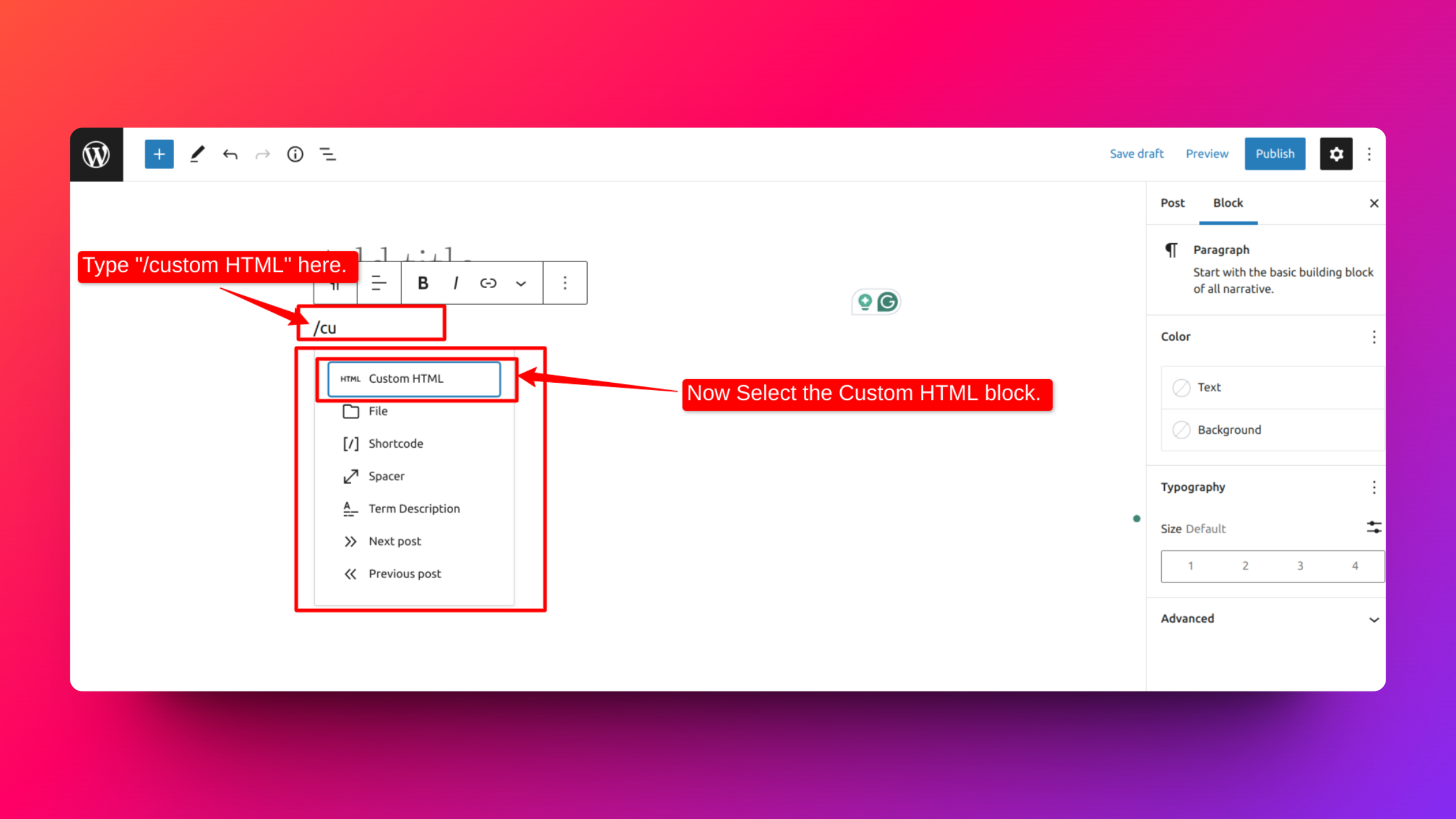
Step-2: Now below Add Title, Type / to choose a block. Now you have to choose Custom HTML block from the drop-down panel.
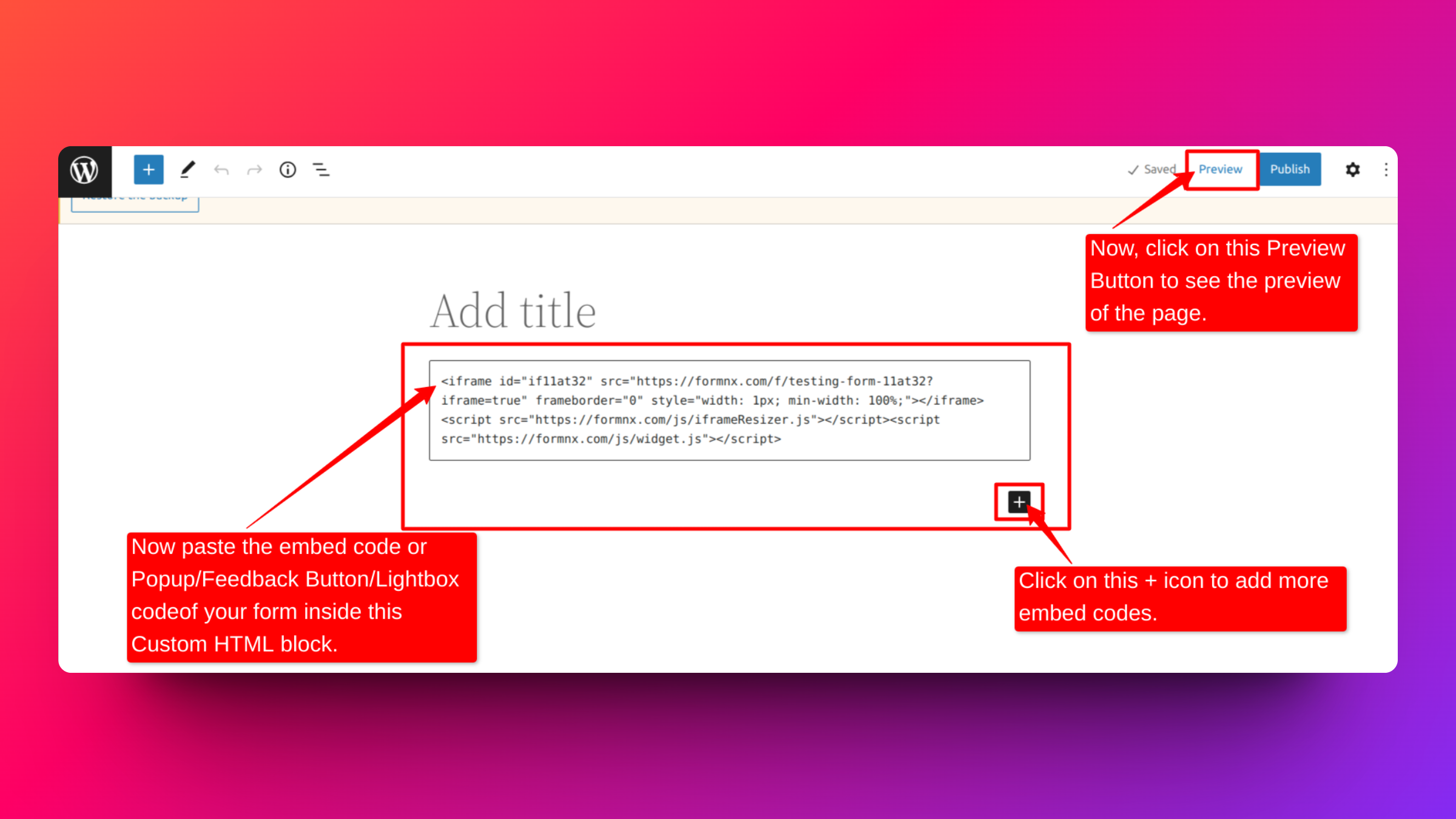
Step-3: Paste the embed code or popup/feedback button/lightbox code from FormNX of your form inside this custom HTML block.
Then, click on the Preview button to check the preview of the page.
Classic Editor - Embedding Forms in WordPress Classic Editor
Follow the below steps to embed forms through the Classic Editor in WordPress:
Step-1: Install the Shortcoder plugin. There are various shortcoders available; for example, you can use this Shortcoder (https://wordpress.org/plugins/shortcoder/).
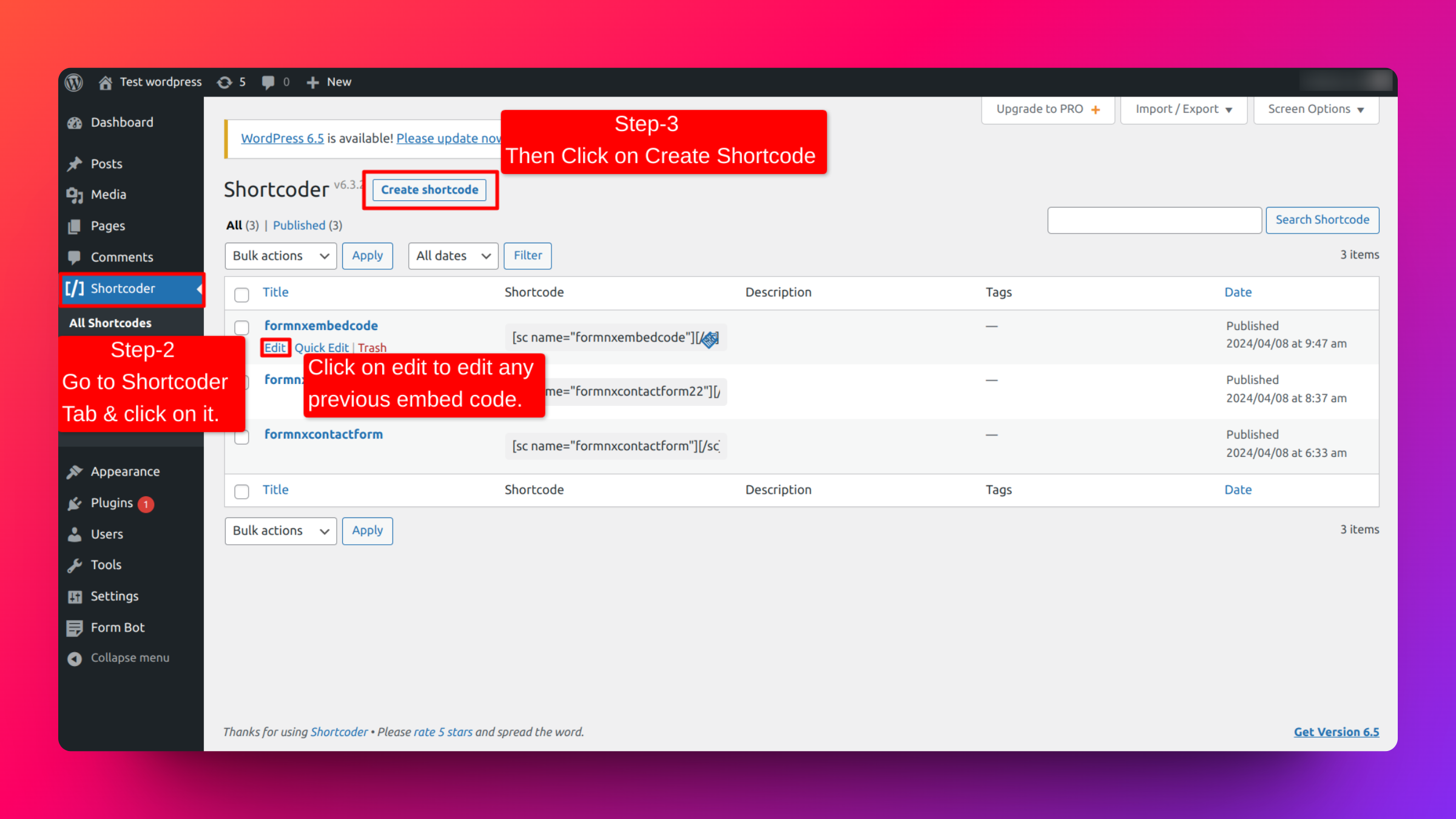
Step-2: Go to the Shortcoder tab on the left panel and click on it.
Step-3: Then click on Create Shortcode inside this tab. And you can also edit any previous embed code by clicking on the edit option.
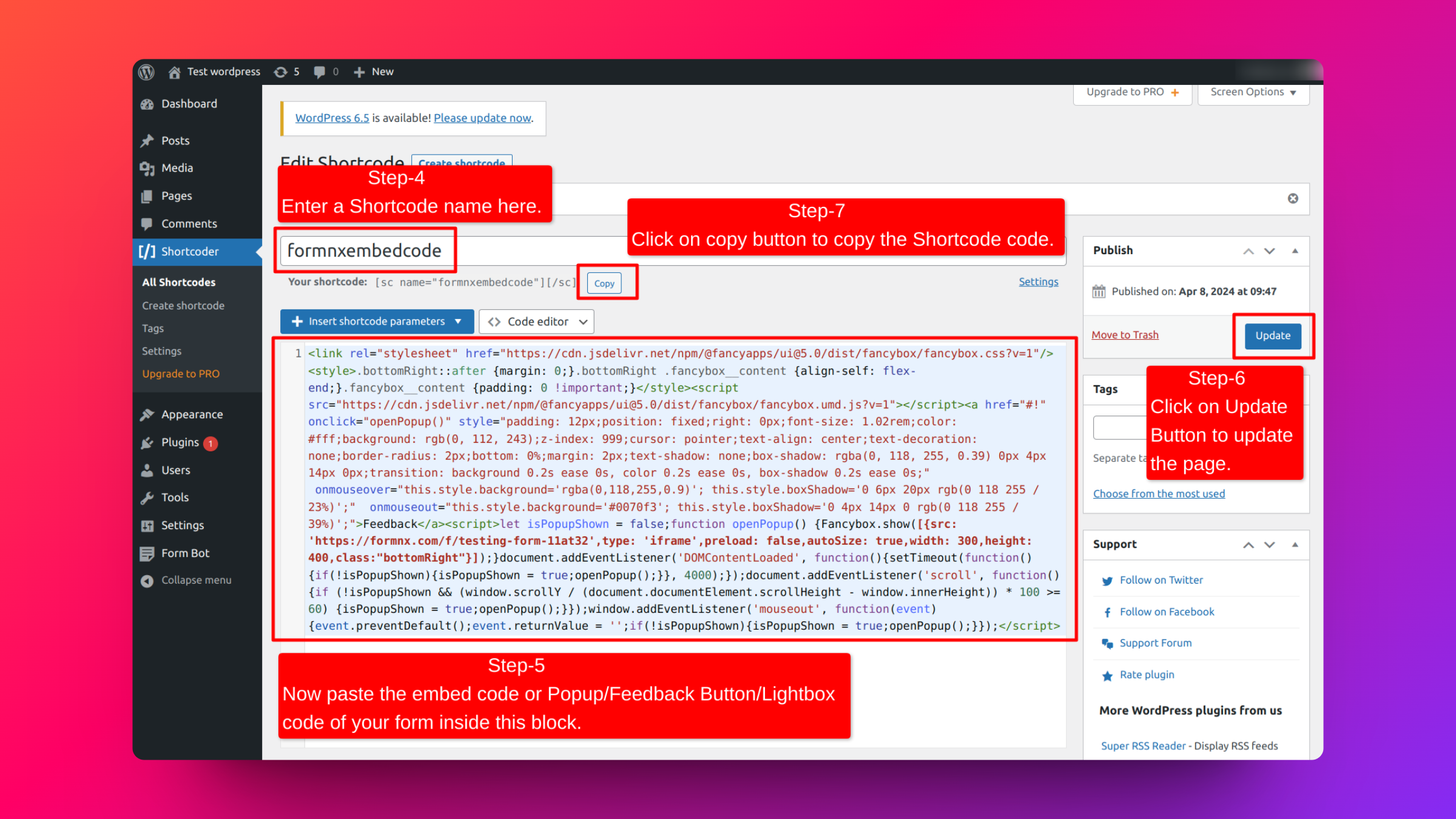
Step-4: Enter a Shortcode name.
Step-5: Paste the embed code or Popup/Feedback Button/Lightbox code from FormNX of your form inside this block.
Step-6: Click on the Update button to update the code of the page.
Step-7: Click on the Copy button to copy the shortcode code.
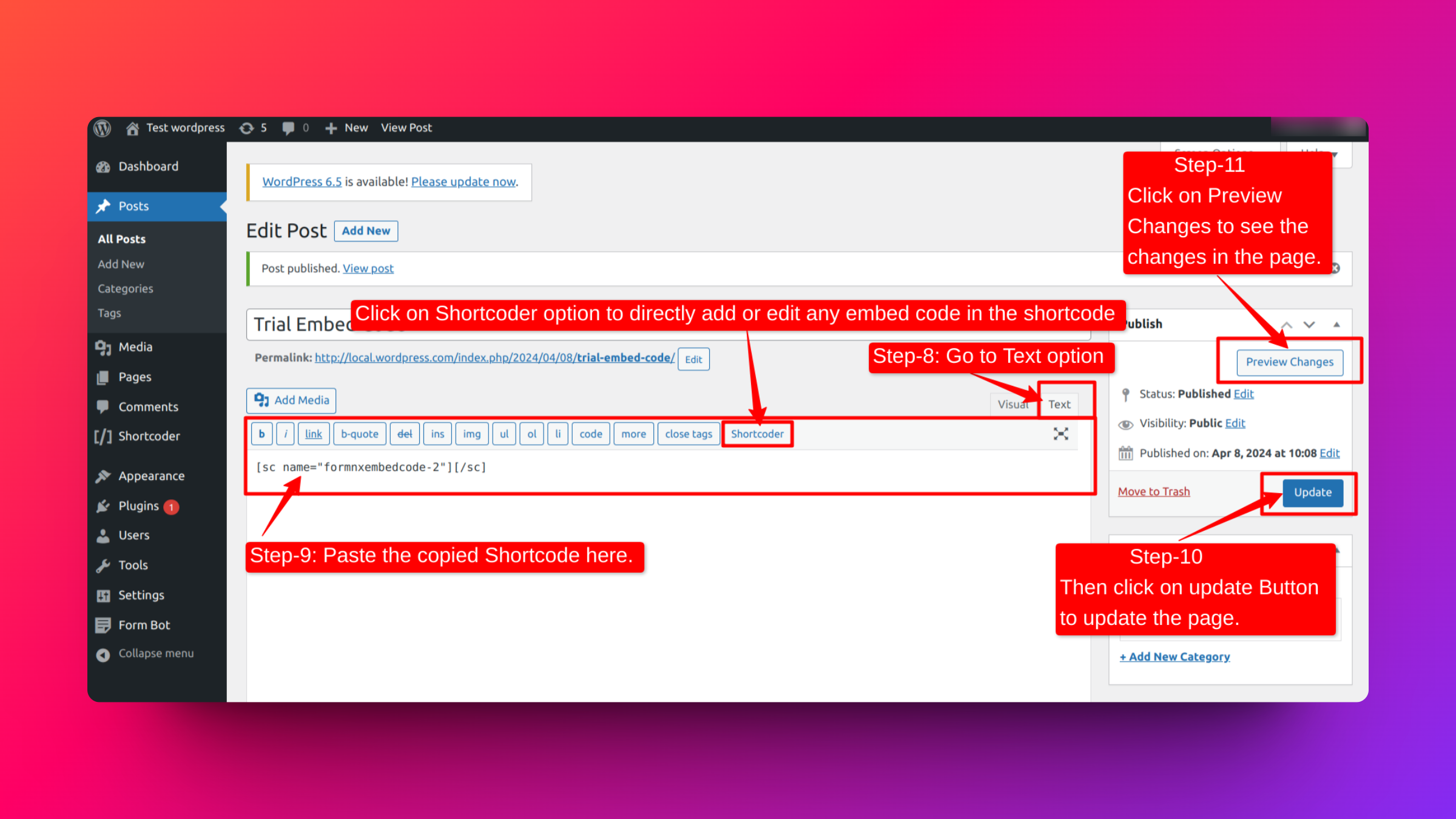
Step-8: Add or edit the posts or pages where you want to add the embed form. Then click on the text option inside this tab.
Step-9: Paste the copied shortcode inside this block.
Step-10: Click on the update button to update the content of the page.
Step-11: Then, click on the Preview Changes button to check the preview of the page.
Elementor Page Builder - Embedding Forms in WordPress Elementor Page Builder
Follow the below steps to embed forms through Elementor Page Builder in WordPress:
Step-1: Go to the post or page where you want to add the form.
Step-2: Press the ‘Edit with Elementor’ button.
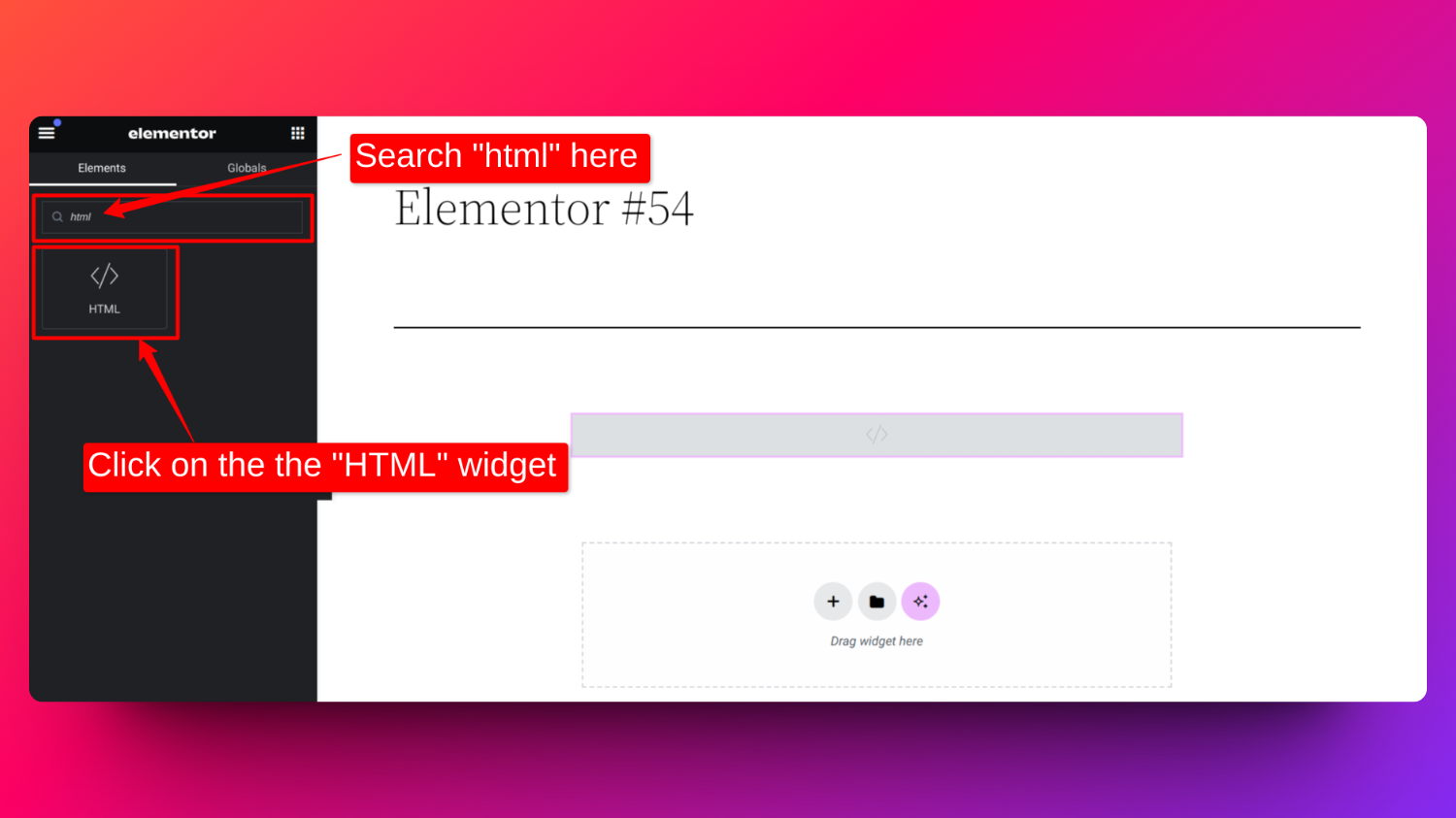
Step-3: In the elements section of the Elementor, search for and select the “HTML” widget.
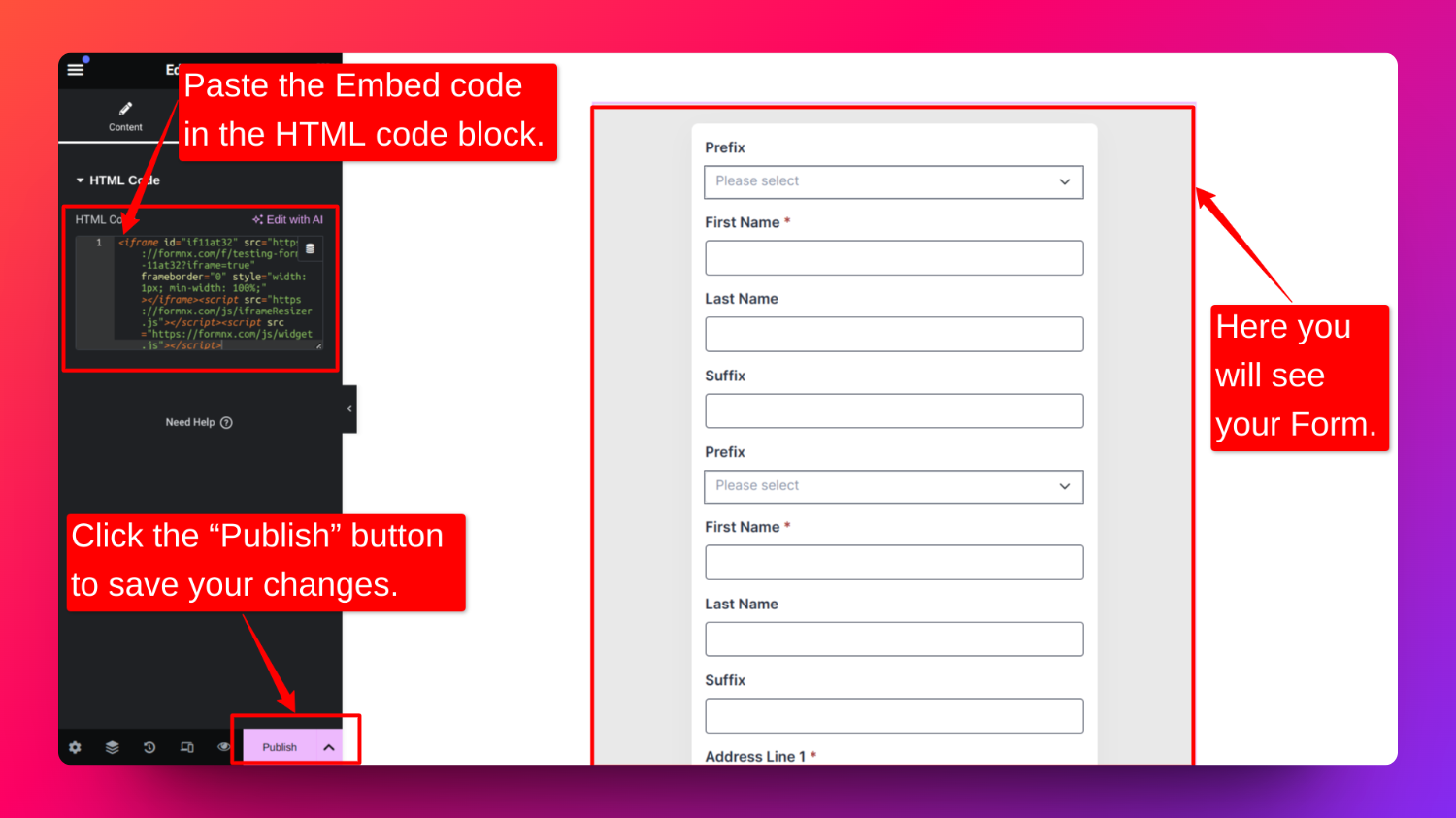
Step-4: Paste the embed code of your form into the HTML widget and click the “Publish” button to save your changes.
FAQs
Do I need to install any WordPress form builder plugin for FormNX forms to work?
No. FormNX forms work with plain embed code in any editor. Also, the FormNX WordPress plugin makes embedding faster by letting you paste a form link instead of embed code.
Where do I download the FormNX WordPress plugin?
You don't need to download anything manually - search for "FormNX" under Plugins → Add New Plugin in your WordPress admin and click Install Now. You can also view the plugin on the WordPress.org plugin directory.
Is there a shortcode for FormNX forms?
Yes - after installing the plugin, use [formnx url="your-form-link"] in the Classic Editor or any page builder that supports shortcodes. You can add height="900" for a fixed height, or type="popup" text="Contact us" to turn it into a popup-triggered button.
Where will i see the submissions of the forms?
Submissions aren't stored in WordPress - you'll see all the form submissions inside "All Responses" tab of the forms.
How do I embed a form in Elementor?
Follow the above steps of "Elementor Page Builder" to embed a form in Elementor. If you've installed the FormNX plugin, a native FormNX Form widget is also available with inline/popup and height controls. Other page builders (Divi, WPBakery, etc.) work through the [formnx] shortcode.
My embedded form shows "Not Found" (404) - what do I do?
This happens if the form uses FormNX's Authorized URLs setting. Add your WordPress site's domain to the form's authorized list under Authorized URLs → General section → Settings in FormNX.
Related feature: WordPress form embed